Wedding planner software for many clients and multi-day weddings
PlanMe gives every client's wedding its own workspace, organised by festivity, and puts all of them on one Master Calendar. Start each client from your own template, invite your team and the family with the roles you choose, and run guests, RSVPs, seating, budgets and vendors in one place. Free during beta.
No credit card. No limit on events or guests during beta.
Illustration with sample clients.
One account for every wedding you're running
Master Calendar
Every client's event dates, festivities, calendar entries, payment due dates and task due dates on one calendar, across all your events.
Your process as a template
Save an event as a template and start the next client from it. Festivities, schedules, menus, tasks, forms, RSVP setup, vendor and budget categories and your team roles come with it.
Roles you define
Create roles for each event and tick what each one can use, from guests and RSVPs to budgets, vendors and the website. Invite your team and your clients by email.
From signed client to the last festivity
- 1
Start from your template
Create the client's event from your saved template, so your usual festivities, tasks and forms are already there.
- 2
Invite the couple and your team
Send email invites with the role you choose. The family can own the guest list while budgets stay with you.
- 3
Run each festivity
Guests, per-festivity RSVPs, seating, menus, hotel stays and the run of show, all organised by festivity.
- 4
Keep the money straight
Budget by category and festivity, payments with due dates, cost-sharing partners and vendor quotes with status.
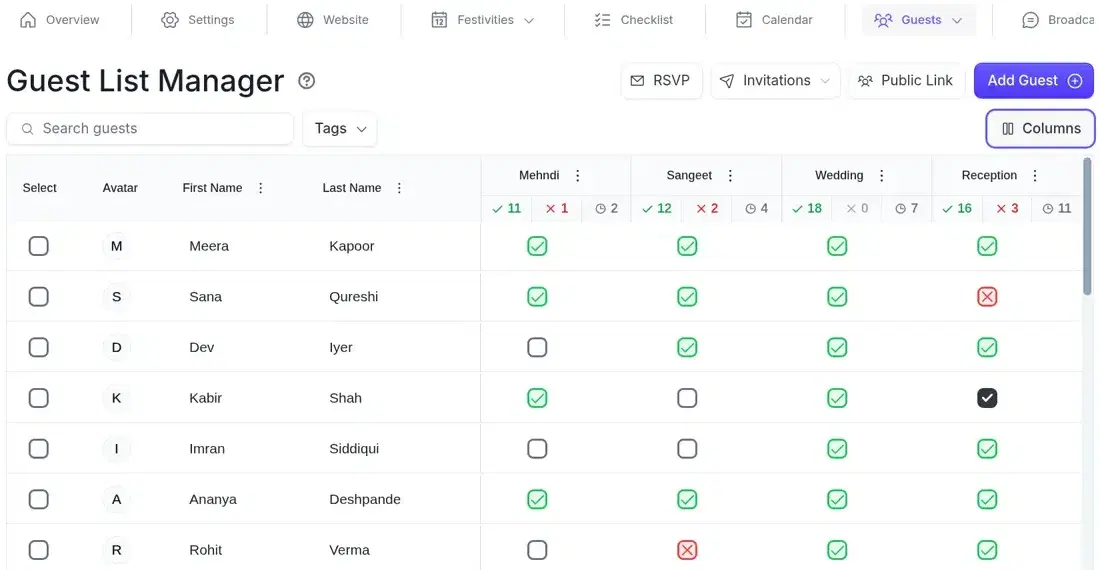
A column for every festivity
Import the family's list from CSV or Excel, group guests into households, and invite each one only to the festivities they're attending. Every festivity keeps its own accepted, declined and pending count.
- CSV and Excel import with column matching
- Households with a head guest, plus tags
- Private RSVP links by email or SMS
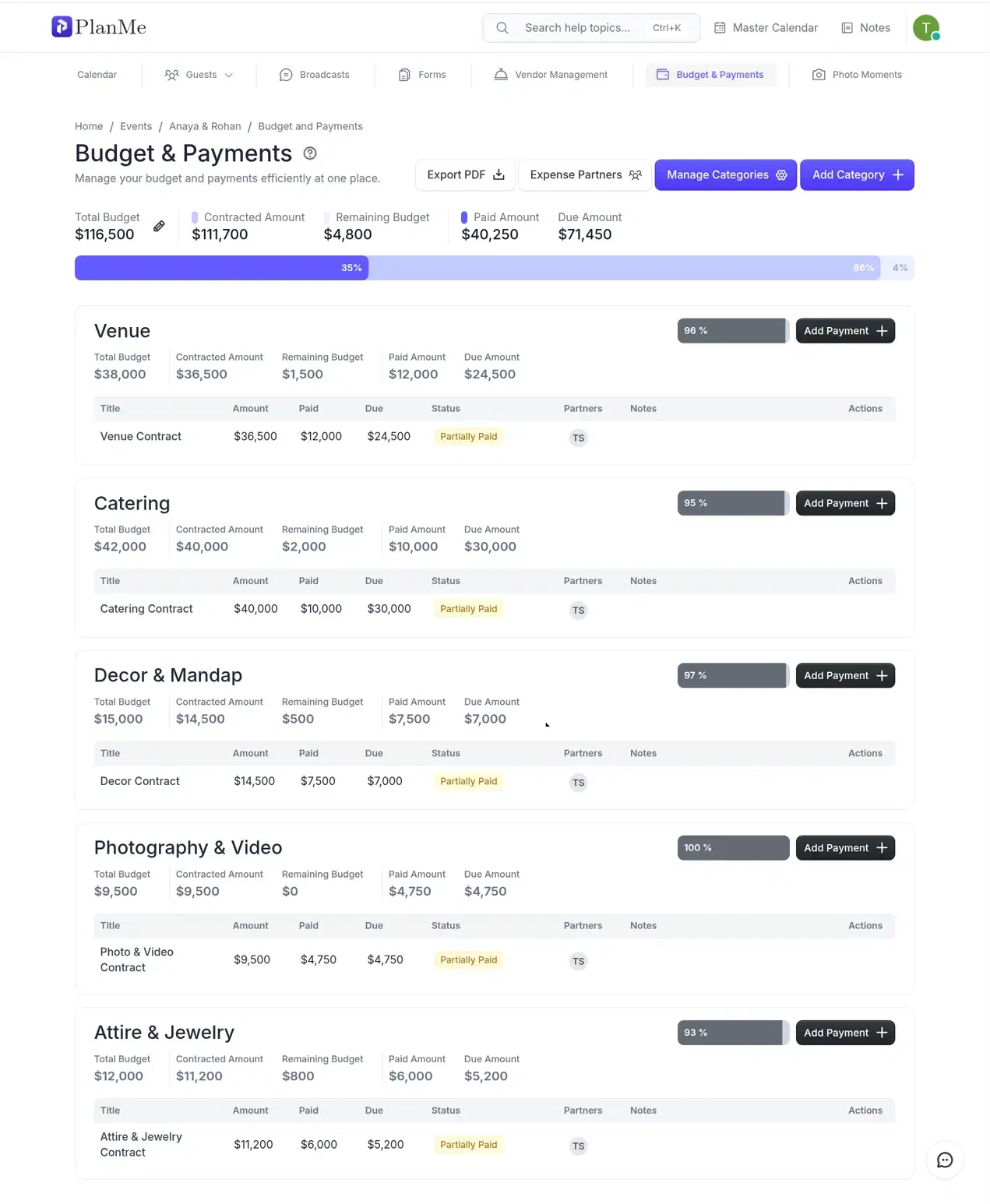
Know what's paid, partly paid and due
Track the client's budget by category and festivity, record every payment with its due date, and see who is paying for what when both families share the cost.
- Budget, contracted, paid and due per category
- Paid, partly paid and pending payments
- Cost-sharing partners and a PDF overview
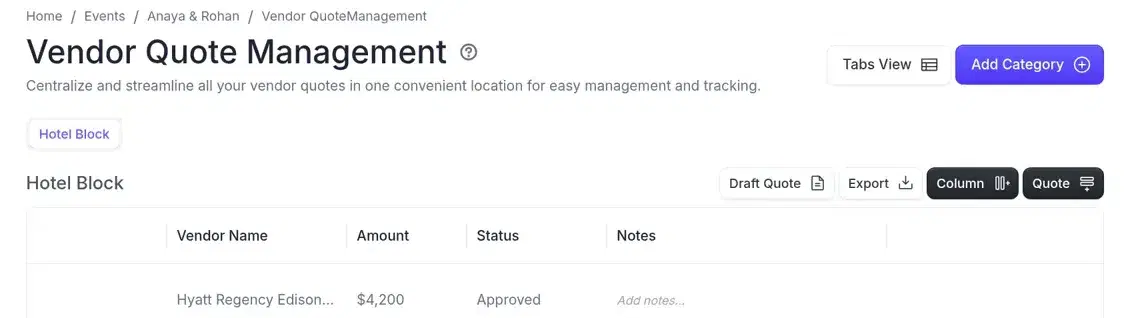
Every quote in one table
Keep quotes by vendor category with the amount, notes and your own columns, and move each one from pending to negotiating to approved.
- Vendor categories with custom columns
- Pending, negotiating, approved and rejected
- Message templates for quote requests
The details that make the weekend run
Run of show per festivity
Schedule every activity with assignees and export it by person.
Seating per festivity
Floor plans with tables, stage and dance floor; PDF and CSV exports.
Menus with dietary tags
Veg, non-veg, vegan and drinks marked on each festivity's menu.
Hotel stays
Which family stays where, in which room type, for which festivities.
Photo Moments
A VIP list with photos and notes, printed as a PDF for the photographer.
Checklist with owners
Tasks with assignees, due dates, priority and a board view.
Exports for the people who need them: guest lists, schedules, menus, seating and budgets.
Where PlanMe fits in your stack
PlanMe is where you and your clients plan the event. It isn't a CRM. Keep your existing tools for leads, proposals, contracts and invoicing, and use PlanMe for everything from the guest list to the last festivity.
See how PlanMe compares with Aisle Planner and othersIn PlanMe
- Festivities and schedules
- Guests, RSVPs and seating
- Budgets and payments
- Vendor quotes
- Website and messaging
- Team and client access
Keep in your other tools
- Leads and CRM
- Proposals and contracts
- Invoicing your clients
Planner questions
More detail on roles, client access and websites in the event planner FAQ.
What is the best wedding planner software for planners with several clients?
It depends on what you need to run. If you need CRM, proposals and invoicing for your business, a business tool like Aisle Planner fits. If you need each client's festivities, guests, RSVPs, seating and budget organised, with a Master Calendar across every event, PlanMe does that and is free during beta.
Can I manage several weddings at the same time?
Yes. Each client's wedding is its own event in your account with separate guests, budgets and vendors, and the Master Calendar shows all of their dates, payments and tasks together.
Can my clients log in and see their plan?
Yes. Invite the couple or their family by email to their own event with a role you create, so they see exactly the parts you choose, such as the guest list and RSVPs.
Can I reuse my planning process for every client?
Yes. Save any event as a template. A new event created from it starts with your festivities, schedules, menus, tasks, forms, RSVP setup, vendor and budget categories and team roles.
Does PlanMe work for multi-day Indian and South Asian weddings?
That's what it was designed around. Each festivity, such as the mehndi, haldi, sangeet, wedding and reception, has its own guests, RSVPs, seating, menu, schedule and budget.
Do guests or clients need to install an app?
No. Guests never log in: they RSVP from a private link sent by email or SMS, or from the event website. You, your team and your clients use PlanMe in the browser on a phone, tablet or laptop.
Is PlanMe an Aisle Planner or HoneyBook alternative?
For running the wedding itself, yes: festivities, one shared guest list, per-festivity RSVPs and headcounts, seating, budgets and vendor quotes, with a live plan the couple and both families can work in. Keep HoneyBook or Aisle Planner for proposals, contracts and invoicing if you use them.
Does PlanMe replace my CRM or invoicing tool?
No. PlanMe is the planning workspace you share with your team and clients. Keep your existing tools for leads, proposals, contracts and invoicing.
How much does PlanMe cost for planners?
Nothing during beta. Every feature is included, with no credit card and no limit on events or guests. Paid plans aren't final yet and will be published on the pricing page.
Bring your next client into PlanMe
We'll walk you through setting up a client's event and your first template.