On this page
- The short answer
- Who needs to see what
- Who is the client, and who owns the account?
- The access map: a worksheet for the kickoff call
- Sharing event by event
- When to open each part of the plan
- Client portal options compared
- Setting up a client family in PlanMe
- Mistakes that cause family drama
- Sources
- Common questions
Most client portal pages are written by software companies about their own product. They list features: files, invoices, timelines, branded logins. Those matter, but they aren’t what goes wrong on a South Asian wedding. What goes wrong is the groom’s father sees the bride’s side’s catering quote, an aunt messages 300 guests the wrong mehndi time, or a reception-only friend is shown the nikah details.
So this guide starts with the people and gets to the software later. We cover what each person needs, a worksheet you can fill in on the kickoff call, how to handle different guest lists at each event, and then how Aisle Planner, HoneyBook, Planning Pod, Joy, Zola, The Knot, a shared Google Drive and PlanMe.Club handle family access, each checked against the product’s own help pages. PlanMe.Club is our product; we say where other tools do this better.
The short answer
A wedding planner client portal is the shared space your clients log in to. For a multi-day Desi wedding it has to do four things a simple portal doesn’t:
- Give different people different access. The couple, the bride’s parents, the groom’s parents and your team each see a different slice, and the budget is usually the most sensitive part.
- Keep one live guest list for all the events. Each family adds its own people, but there is one list, with invitations and RSVPs tracked per event (mehndi, sangeet, ceremony, reception), not one spreadsheet per family.
- Keep guests out of it. Guests need their own invitations and RSVPs for only their events, without seeing your planning workspace.
- Be easy enough for the elders. If a parent can’t get in, you become the help desk and the portal turns back into group-chat forwards.
Decide who sees what before you pick or set up a tool. The access map below is the worksheet we’d use.
Who needs to see what
When planners compare notes, the advice keeps coming back to the same point. In a January 2026 thread titled “What portals do you use?” on r/EventPlanners, one reply summed it up:
The most consistent feedback we hear is that clients care about clarity and visibility, not features.
Clarity starts with knowing who you are building the view for. On a South Asian wedding, it’s usually these groups:
The couple
They want the whole picture: every event, the guest list, RSVPs as they come in, the checklist, the website draft and, if they’re paying, the budget. What they usually don’t need is the ability to message every guest at once, or to edit your vendor contracts.
Each set of parents
In many Desi families the parents host and pay for some or all of the events, so they’re clients too. Each side usually owns its own guest list, often several hundred names with spellings only they know, and wants to see who has replied. Whether they see the budget depends on who’s paying for what. It comes up a lot: a long-running r/weddingplanning thread asks for the “best guestlist database/template so that I can give my mom and FMIL access”, and on r/DesiWeddings couples ask for a spreadsheet catered to Desi weddings that can handle several events.
The family point person
There’s often one person on each side, a sibling, cousin or aunt, who does the typing for the parents. Give that person their own access instead of a parent’s login.
Elders who will never log in
Some grandparents and older relatives won’t use any portal. Don’t design around them. Plan to send them the schedule for their events by message or on paper, and make sure the family point person has what they need.
Your team
Coordinators need almost everything they work on, but usually not the ability to add or remove people from the wedding. Keep that with the lead planner.
Vendors
The decor lead, the DJ, the mehndi artist and the caterer each need the run of show for their event, load-in times, the venue contact and a headcount. They don’t need the budget, other vendors’ quotes or the guest list.
Guests
Guests don’t belong in the planner portal. They need the wedding website and an RSVP for only the events they’re invited to, and a reminder if they haven’t replied. Our guide to RSVPs for multiple events covers that side in detail.
Who is the client, and who owns the account?
Settle two questions on the first call, because the software can’t settle them for you.
1. Who makes the final call?
On a Desi wedding the person who signs your contract isn’t always the person who decides. It might be the couple, the bride’s parents, or both families together. Threads like “Parents want us to keep a wedding planner neither my fiancée nor I want to work with” on r/DesiWeddings show how quickly that gets uncomfortable. Write down who approves what (guest list cuts, menus, vendor contracts, anything that changes the budget) and mirror it in the access you give.
2. Who owns the wedding in the software?
Joy’s own guidance for coordinators is clear: in its help article for wedding coordinators, Joy says “the couple should own the website,” recommends the couple create the event and invite the coordinator as a collaborator, and notes that a collaborator can’t remove the couple from their own site. That’s a good rule for any tool: the family should never lose access to their own guest list because a planning contract ended.
Some couple-focused tools still suggest the opposite: one shared login. Zola’s help center says it doesn’t offer wedding planner-specific logins and that you can invite one partner to the account. The Knot’s help center says there isn’t a way to add another email to an account, and suggests sharing the login or creating a shared planning email. That works for two people. It doesn’t work when six relatives and a planning team all need different access, and you can’t take one person’s access away without changing everyone’s password.
The access map: a worksheet for the kickoff call
Fill this in with the couple before you invite anyone. It’s a starting point, not a rule. Change any cell to match who is paying and who is doing the work in this family.
| Part of the plan | Couple | Bride’s parents | Groom’s parents | Your team | Day-of vendors |
|---|---|---|---|---|---|
| Events list (dates, venues, times) | Yes | Yes | Yes | Yes | Their event only, sent to them |
| Guest list | Yes | Yes (their side) | Yes (their side) | Yes | No |
| Invitations and RSVPs per event | Yes | Yes | Yes | Yes | Final count only |
| Messages to guests | Optional | No | No | Yes | No |
| Budget and payments | If paying | If paying | If paying | Lead planner | No |
| Vendor quotes | Yes | If paying | If paying | Yes | No |
| Checklist and tasks | Yes | Their tasks | Their tasks | Yes | No |
| Run of show per event | Yes | Yes | Yes | Yes | Their event, sent to them |
| Wedding website draft | Yes | Optional | Optional | Yes | No |
| Who is in the workspace | No | No | No | Lead planner | No |
Three things to notice:
- “Their side” is about who edits, not who sees. Most tools, PlanMe.Club included, don’t hide half of one guest list from one family. If each side should only touch its own guests, agree that on the call and tag every guest by side so you can filter and check. If the two families must not see each other’s lists at all, that’s a conversation for the couple before it’s a software setting.
- Messages to guests are the riskiest switch. One wrong broadcast reaches everyone. Keep it with your team, and the couple if they insist.
- Money is the most sensitive row. Aisle Planner’s privacy settings article uses this exact example:
This is perfect for the case where your bride wants her mom involved in some of the plans, but not all, OR perhaps there are certain things, like the budget, that is off-limits to say, the Father of the Bride!
On a Desi wedding, the usual version is two families splitting costs by event: the bride’s side pays for the mehndi and the wedding, the groom’s side for the reception, and both chip in for the sangeet. If that’s your client, our guide to budgeting a multi-event wedding shows how to keep a budget per event and record which family paid what, so you can share totals without showing every quote.
Give both families the same expected headcount, event by event
Before anyone argues about the guest list, agree on the numbers. The guest attendance calculator estimates how many invited guests will say yes to the mehndi, sangeet, ceremony and reception from the share who are traveling in. It runs on the page, with no sign-up, so you can share the result on the kickoff call.
Open the attendance calculatorSharing event by event
This is where Desi weddings differ most from what portals are usually built for. The haldi might be 40 close family, the sangeet 250, the ceremony 300 and the reception 400, each with a different list. Joy has a whole article on managing multiple events with different guest lists for Indian weddings, and our guest list template by event shows the one-row-per-guest layout that makes it work.
For the portal, it helps to split the problem by audience:
- Guests should see only the events they’re invited to. This one’s non-negotiable: a reception-only colleague shouldn’t be shown the nikah or the haldi. Check that your RSVP tool does this per guest, not per page.
- Family and team usually need every event, because they are planning all of them. Per-event restrictions for them are rarely worth the setup.
- Vendors mostly work one event. Rather than giving them a login that shows the whole weekend, send each vendor the run of show for their event only, and update it in one place when times change.
Some portals can restrict clients to specific events: Planning Pod’s Client Portal shows clients only the events and items they are assigned to. That’s handy for planners who run many separate events for one client. For one wedding weekend, the bigger win is getting the per-event guest list and headcounts right.
When to open each part of the plan
You don’t have to give everyone everything on day one. Aisle Planner builds this in: tools start in Prep Mode and stay hidden from clients until you release them, so you can finish the budget or a layout before the family sees it. Whatever tool you use, the same rhythm works:
| When | Open to the family | Keep with your team |
|---|---|---|
| Kickoff (9 to 12 months out) | Events with dates and venues, the access map, each family’s guest list to start adding names | Draft budget and vendor shortlists |
| Vendors booked (6 to 9 months) | Approved vendors and, for whoever is paying, the budget and payments due | Quotes still being negotiated |
| Invitations (3 to 4 months) | RSVPs per event, so each side sees replies come in | Messages to guests |
| Final six weeks | Final headcount per event, run of show, family tasks for the weekend | Vendor call times and load-in details |
| After the wedding | Final payments and anything still owed | Remove vendor and team access once everything is settled |
For the full planning timeline these steps sit inside, see the Indian wedding checklist. For guest travel details that families will ask about, the guest itinerary template has a sample 3-day schedule.
Client portal options compared
PlanMe.Club is our product. Every other row links to that product’s own help center, checked October 22, 2026. We don’t list costs here. Plans change, so check each product’s own site.
| Option | How clients get in | Per-person control | Best for |
|---|---|---|---|
| PlanMe.Club (ours) | Email invitation to the wedding; each person signs in with their own account | Roles you name, each with the areas you tick; on or off per area, no read-only setting; per wedding, not per event | Multi-day weddings where the couple, both families and your team share one live plan |
| Aisle Planner | Email invitation, then an account via your branded login page | Full, read-only or no access per person and per tool; Prep Mode hides tools until released | Wedding studios that want CRM, timelines, layouts and a branded client view in one tool |
| HoneyBook | Portal link sent with your files and emails | Clients see shared files, messages, invoices and the project details you share; internal notes stay hidden | Contracts, invoices and payments with the least setup |
| Planning Pod | “Client (Portal Only)” access with an email to set up a login | Tools switched on or off for all clients; each client sees only assigned events and items | Firms running many events, venues or corporate work |
| Joy | Couple invites a collaborator by email | Collaborators get full access except deleting the website | Couples who want their planner inside a free wedding website |
| Zola | One invited partner per account | No planner-specific login | A couple planning with one partner, family or planner |
| The Knot | Shared login or shared planning email | None beyond sharing the login | Couples who mainly want the website and vendor marketplace |
| Shared Google Drive | A link; everyone already has an account | Edit or view per file; protected ranges in Sheets | Planners and families who want something familiar |
Where other tools do this better than PlanMe.Club
- Branded client experience: Aisle Planner gives clients your branded login page, and HoneyBook lets you customize the portal’s fonts, colors and header. PlanMe.Club has no white-label branding.
- Read-only access: Aisle Planner can set a tool to read-only for one person. In PlanMe.Club an area is either on or off for a role.
- Contracts and payments to you: HoneyBook, Aisle Planner and Planning Pod handle proposals, contracts and invoices. PlanMe.Club doesn’t.
- Familiarity: a shared Google Drive needs no new login, which is why so many planners in that r/EventPlanners thread stick with it. One planner there said they like that the timeline “updates in real time” for vendors.
The login problem is real for every portal, ours included. Another planner in the same thread said that with the dedicated platforms they tried, “the login/password thing was a real friction point,” and they spent “half my time being tech support.” Plan for it: walk each family through their first sign-in on the kickoff call.
If you’re choosing tools beyond the portal, our software for South Asian wedding planners guide pairs a business tool with a shared workspace, and Joy vs Zola vs The Knot for multi-event weddings compares the couple-facing tools.
Setting up a client family in PlanMe
Here’s how we’d set up a client using our fictional Anaya & Rohan showcase: a four-event weekend (mehndi, sangeet, wedding and reception) in New Jersey. Checked against the product on October 22, 2026.
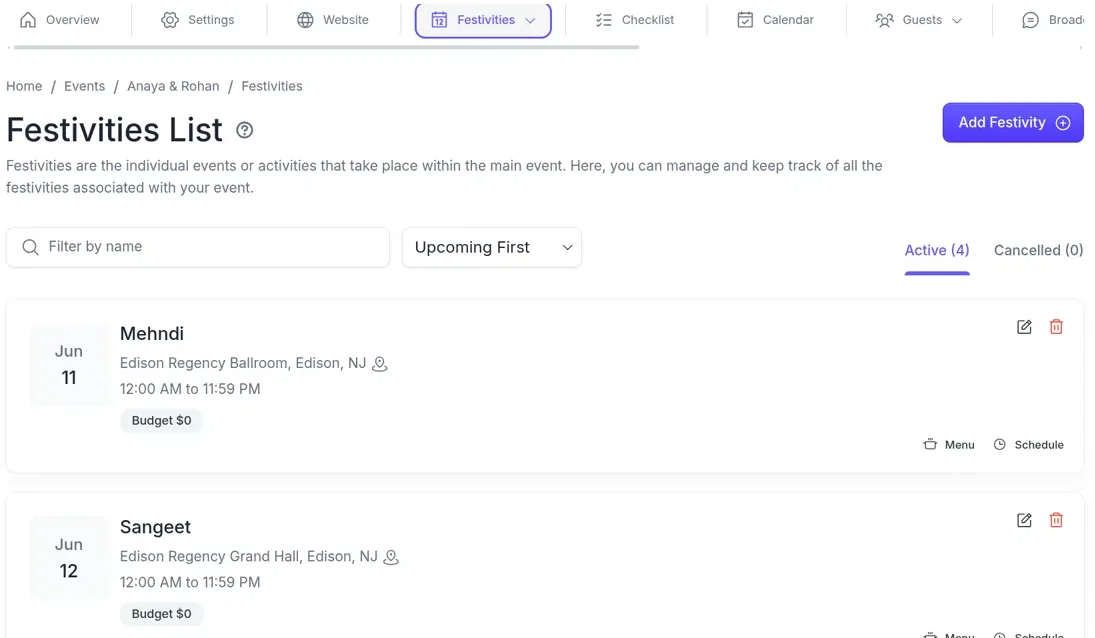
One word first: in PlanMe, each event in the wedding weekend (mehndi, sangeet, wedding, reception) is called a festivity, so that is the name you’ll see on the Festivities screen below.
- Create the wedding and add each event. Each one gets its own date, venue, times, menu and schedule. Switch off any modules this family won’t use so their view stays simple.
- Create roles from your access map. In Members & Permissions, create roles such as Couple, Bride’s parents, Groom’s parents and Coordinator, and tick the areas each can use: Guest Management, RSVP, Budgets & Payments, Vendor Management, Checklist, Broadcasts, Website and so on.
- Invite each person by email. They join with their own login. Pending invitations show when they expire, and you can resend or revoke them. Roles belong to this wedding only, so inviting a family member here gives them nothing in your other clients’ weddings.
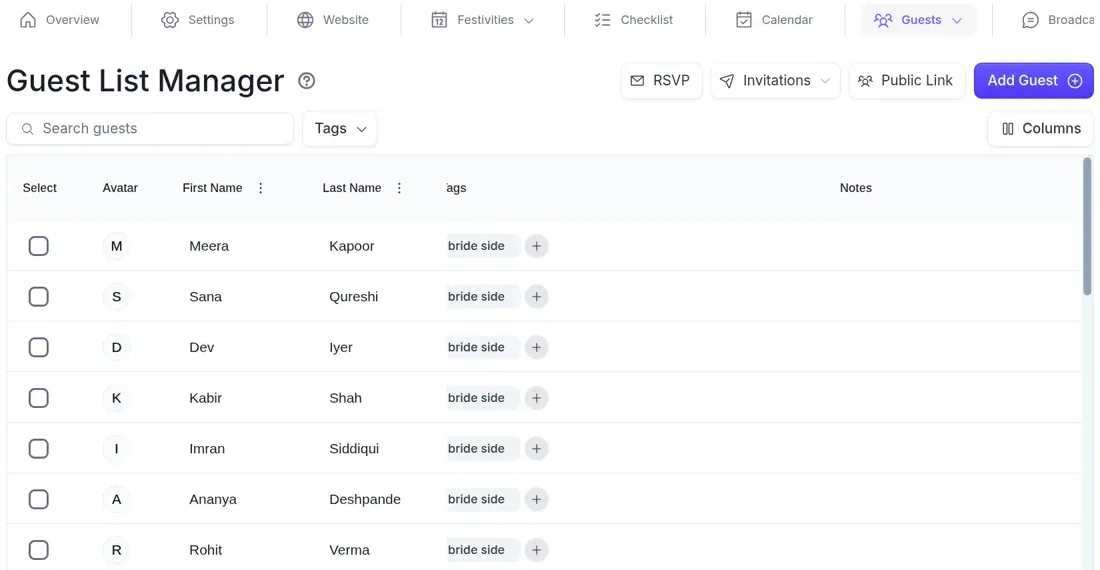
- Bring in both guest lists. Import each family’s list, group guests into households and tag each guest by side, so either family can filter to its own people.
- Invite guests event by event. Each household gets a private RSVP link by email that shows only the events they’re invited to. Guests never log in to the workspace.
- Assign family tasks. Checklist tasks can be assigned to the people you invited, so “send the groom’s side addresses” sits with the person who will do it.
- Send vendors their event, not the workspace. Export the schedule for one event as a PDF and send it to that event’s vendors.
The guest list is shared by everyone with access to it, and the side tags are how each family finds its own guests. Invitations and RSVP counts are tracked per event, so on any day both families can see how many have said yes to the sangeet without asking you for an export.
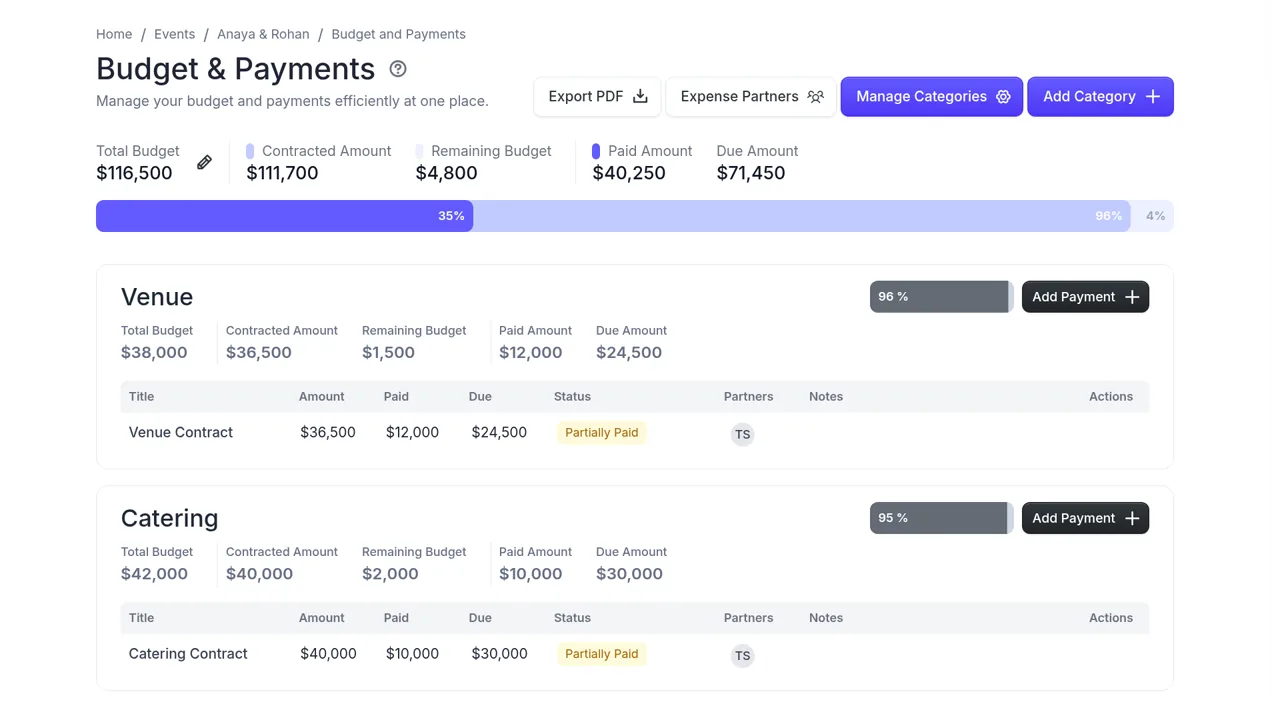
The budget is the area to think hardest about. Budgets & Payments shows categories with budget, contracted, paid and due amounts, and Expense Partners record which family paid what. Tick it only for the roles that should see money. Vendor Management stores each quote you collect with its amount and status. It isn’t a vendor marketplace, and anyone with access sees every quote.
What PlanMe.Club doesn’t do, so you can plan around it:
- No per-event access for collaborators: a role that can see the events list sees every event.
- No read-only setting: an area is on or off for a role.
- No white-label portal, proposals, contracts or invoicing; keep your business tool for those.
- No chat-app sending. Guest messages go by email or SMS, picked by guest tag or RSVP status, not per event.
More answers on roles and running several clients are in the event planner FAQ, and the planner overview is on wedding planner software.
Set up your next client family in PlanMe
Create the client’s wedding, add each event, then invite the couple, both sets of parents and your team by email, each with a role you define. Everyone works from the same live guest list, RSVPs, checklist and budget, and guests only ever see the events they are invited to. Free during beta.
Start planning in PlanMeMistakes that cause family drama
- One shared login for the whole family. You can’t tell who changed what, and you can’t remove one person without locking out everyone.
- Budget visible to the side that isn’t paying. Agree on the money row of the access map before anyone is invited.
- Everyone can message guests. Keep broadcasts with one person on your team.
- Vendors given the whole workspace. Send them their event’s schedule instead.
- Catering from one big number. Each event needs its own headcount from its own RSVPs, not the reception’s.
- No walkthrough. Ten minutes on the kickoff call to get each family signed in saves weeks of “I can’t find it.”
- Access left open after the wedding. Remove vendors and temporary helpers once the last payment is settled.
Sources
Checked October 22, 2026. Product details come from each product’s own help center. Reddit comments are quoted as posted and are opinions, not data. The access map and sharing rhythm are our own suggestions.
- Aisle Planner: What Privacy Settings Does Aisle Planner Have in Each Project?
- Aisle Planner: What Do My Clients See in Aisle Planner?
- HoneyBook: What clients can see and do in the client portal
- HoneyBook: Announcing the new and improved client portal
- Planning Pod: Setting Permissions and Granting Client Access to the Client Portal
- Joy: Using Joy as a Wedding Coordinator
- Joy: Inviting a Collaborator
- Joy: How to Manage Multiple Wedding Events with Different Guest Lists for Indian Weddings
- Zola: Can my wedding planner have a login to my Zola account?
- The Knot: How do I add my partner’s email address to my account?
- r/EventPlanners: What portals do you use?
- r/weddingplanning: Best guestlist database/template so that I can give my mom and FMIL access to?
- r/DesiWeddings: Spreadsheet catered to desi weddings?
- r/DesiWeddings: Parents want us to keep a wedding planner neither my fiancée nor I want to work with
Common questions
What is a wedding planner client portal?
A client portal is the part of a planner's software that the couple and their family log in to. Depending on the tool, it shows shared files, contracts and invoices, the checklist, the timeline, the guest list and RSVPs, and messages with the planner. For a multi-day Desi wedding, the real test is whether it can give the couple, each set of parents and your own team different access to the same live plan.
Do couples need a login for a client portal?
Usually yes. Aisle Planner, HoneyBook, Planning Pod and Joy all invite clients by email and have them create or sign in to an account. In PlanMe.Club the couple and family also join with their own login, by email invitation, with a role you set. Guests are different. In PlanMe.Club they never log in; each guest replies through a private RSVP link.
Can parents see the guest list but not the budget?
In most planner tools, yes. Aisle Planner lets you give each person full, read-only or no access to each tool. In PlanMe.Club you create a role such as Bride's parents, tick the guest list and RSVPs, and leave Budgets & Payments unticked. PlanMe.Club roles are on or off per area, and there's no separate read-only setting.
Can vendors see only their own event?
Not in PlanMe.Club today. Access is set per area of the whole wedding, not per event, so a vendor role that can see the events list sees every event. For most vendors, it's cleaner to export the schedule for just their event as a PDF and send that. Planning Pod shows clients only the events and items they are assigned to, and Aisle Planner can add vendors to a project with limited permissions.
Is there a free client portal for wedding planners?
A shared Google Drive is free and is still what many planners use. Joy is free for couples and lets them add a planner as a collaborator with full access. PlanMe.Club is free during beta; paid plans are planned, but the details aren't final. HoneyBook, Aisle Planner and Planning Pod are paid products with trials, so check their own sites for current plans.
Does PlanMe.Club replace HoneyBook or Aisle Planner?
No. PlanMe.Club has no proposals, contracts, invoicing, client payments or white-label branding. Keep your business tool for that side, and use PlanMe.Club as the shared workspace where the couple, both families and your team run the events, guest list, RSVPs, vendor quotes and budget.