On this page
- Download the template
- What columns does an Indian wedding guest list need?
- One row per person, grouped by household
- Building the list with both families
- Tiers decide who comes to which festivity
- Headcount formulas per festivity
- Columns for guests who travel in
- When the spreadsheet stops working
- Import the sheet into PlanMe.Club
- Sources
- Common questions
Most wedding guest list templates are built for one ceremony and one reception: a name, an address, a single RSVP box. Desi couples notice the gap fast. One r/DesiWeddings post asks for a spreadsheet that fits “3-4 events, different guest lists for each event,” because the Western-style planner sheets they had found weren’t built for that. The top reply gives the same advice we would: keep the guest list on one sheet, with a column per event and a simple Y or N for whether each person is invited.
That is what this template does, with a few things added from the questions families actually ask: whose list a name came from, which side, which tier, who is a child, who eats Jain or halal, and who is flying in from Toronto, London or Pune. If you already know which festivities you are hosting, start with the download. If not, read Indian wedding events in order first and come back.
Download the template
Pick the .xlsx if you want the dropdowns and the Headcounts sheet. Pick the blank CSV if you only want the columns to paste your own list into. The example CSV is the same fictional Anaya and Rohan list as the example sheet, handy for testing an import before you use your real list.
Download the guest list template (free, no sign-up)
- Guest list template (.xlsx: opens in Excel, Google Sheets or Numbers)
- Blank template, column headers only (.csv)
- Example rows for Anaya & Rohan, fictional (.csv)
Inside the .xlsx: a blank Guest list sheet with dropdowns for 1,000 rows, a filled-in Example sheet (17 people in 9 households), a Headcounts sheet whose formulas fill in per festivity, and a short Read me. Festivity columns are Mehndi, Haldi, Sangeet, Wedding and Reception; rename them for a nikah, walima, Anand Karaj, garba or pithi.
Google Sheets: upload the .xlsx to Google Drive, open it with Google Sheets, then choose File, Save as Google Sheets. Share that one copy with both families instead of emailing versions around. Rename the festivity columns before anyone starts typing, and rename the matching RSVP column at the same time.
Planning the money as well? Our Indian wedding budget calculator prices each festivity from its own guest count, which is exactly the number this sheet gives you. All our free calculators and templates are on the tools page.
What columns does an Indian wedding guest list need?
Enough to answer four questions for every person: who are they to us, are they invited to this festivity, are they coming, and what do they need when they get there. Desi wedding sites that publish templates mostly agree on the core. Shaadify’s template pairs an invited column and an RSVP column for each event, Mandap Chat’s 12-column version adds family side, relationship group, meal notes and a follow-up owner, and Wedd.ai’s sample adds arrival, room and pickup details. Ours keeps those ideas and organizes them into four groups.
| Group | Columns | Why it’s there |
|---|---|---|
| Who they are | Household, First Name, Last Name, Added by, Side, Relationship, Tier, Age group | Keeps families together, shows whose list each name came from, and gives you something to cut by |
| How to reach them | Email, Phone Number (with country code), Address | Invitations, reminders and, later, thank-you cards |
| What they need | Travelling from, Travel (Local, Domestic, International), Needs hotel, Diet, Allergies & access | Hotel block, airport pickups, caterer counts, step-free seating for elders |
| Each festivity | Mehndi, Haldi, Sangeet, Wedding, Reception (invited: Yes or No), then an RSVP column for each, plus Invite sent and Notes | Each festivity gets its own invited count, yes count and reminder list |
Two details make the sheet easier to live with. The first three columns are frozen, so names stay on screen while you scroll across five festivities. And the festivity columns use plain Yes and No from a dropdown, not ticks, colours or initials, so formulas can count them and other tools can import them.
One row per person, grouped by household
Some templates use one row per family with a party size. That is quicker to type, and for a single-day wedding it is fine. On a Desi weekend it breaks the first time a family splits across festivities. In our example, the Shahs are four people: Kabir, Meera, their adult son Rohit and six-year-old Tanvi. All four are invited to the sangeet and the wedding, but Tanvi is not invited to the late reception. One row with “4” can’t say that. Four rows with the same Household value can.
The household is the unit you invite and remind. The person is the unit a caterer, a shuttle and a chair count. This is the same rule people land on in r/weddingplanning: one commenter in a guest list thread describes giving everyone on one invitation the same “RSVP #” and listing large families eldest uncle first, then his family, then the next uncle. Our Household column does the same job, with the family name in it so a sort keeps them together.
Rules that save arguments later
- Name everyone. An invitation can say “and family.” The sheet shouldn’t. If the household is four people, it gets four rows with four names, or you will be guessing at the reception count in the last month.
- Give adult children their own household once they live separately or have a partner. They reply on their own timeline, and they may be invited to the mehndi when their parents are only invited to the wedding.
- Plus-ones are rows too. Add the partner’s name if you know it and put them in the same household. Then decide per festivity: welcome at the reception, maybe not at a family haldi.
- Mark children in Age group. Kids change menus, transport and late nights, and the Headcounts sheet counts them separately for every festivity.
Building the list with both families
Desi guest lists are built by committee: the couple, both sets of parents, and often a few aunts with strong opinions. That is why the template has an Added by column (Bride, Groom, Bride’s parents, Groom’s parents, Both) next to Side. Side says which family a guest belongs to; Added by says whose list they came from. When the venue cap forces cuts, Added by is how each person trims their own names instead of someone else’s. Threads like “Parents and bf cannot agree on guest list” on r/DesiWeddings are what the column is for.
A merge that works
- Share the empty template first. Each family fills the same columns, so nothing needs reformatting later. Ask for phone numbers with country codes (+1, +44, +91, +92, +880) from the start.
- Paste both lists into one Guest list sheet. One master list, not a bride tab and a groom tab. Everything else, including the headcounts, reads from it.
- Find the people both families added. Sort by last name, then scan phone numbers. Common family friends and relatives related to both sides show up twice. Keep one row for each and set Side to Both. Nikhil Kapoor in the example is one of these.
- Agree on a cut-off date. After it, a new name needs both families to agree. Lists grow quietly for months otherwise.
- Keep a backup. In the same r/weddingplanning thread, one commenter who shared a Google Sheet with both sets of parents warned others to keep an original copy, because their mom had accidentally deleted half of their fiancé’s family. Google Sheets’ version history can undo that, but only if someone notices.
Tiers decide who comes to which festivity
In many Western templates, an A list and a B list mean “invite first” and “invite if people decline.” On a South Asian weekend, tiers usually mean something more useful: how close someone is decides how many festivities they are invited to. Write the tier down once, and the festivity columns follow from it.
| Tier | Who | Invited to |
|---|---|---|
| A | Immediate family, grandparents, closest friends | Everything, including the haldi (some A-list friends skip the family haldi) |
| B | Extended family, friends, family friends | Mehndi or sangeet, wedding, reception |
| C | Parents’ friends, wider community | Wedding and reception |
| D | Colleagues, neighbours | Reception only |
Your tiers will look different: some families keep the mehndi small and the sangeet huge, and a Sikh weekend may centre on a morning Anand Karaj (see Indian wedding events in order for the usual sequences). The point is that the tier is decided once, by the families, and not by who happens to ask. The Headcounts sheet also has a small side-by-tier grid, so you can see at a glance whether the bride’s side has 60 tier B guests and the groom’s side has 15.
The full invite matrix (households down the side, festivities across the top) and how replies flow through it is covered in our guide to RSVPs for a multi-event wedding, including reminder texts you can copy. This page is the list underneath it.
Headcount formulas per festivity
Every number a vendor will ask for is a COUNTIFS over two columns. In the template, the festivity columns are Q to U (Mehndi, Haldi, Sangeet, Wedding, Reception) and the RSVP columns are V to Z, in the same order. Age group is column H and Diet is column O. So for the sangeet:
| What you need | Formula (Excel or Google Sheets) |
|---|---|
| People invited to the sangeet | =COUNTIFS(S:S,"Yes") |
| Said yes | =COUNTIFS(S:S,"Yes",X:X,"Yes") |
| No reply yet (your reminder list) | =COUNTIFS(S:S,"Yes",X:X,"") |
| Children coming | =COUNTIFS(X:X,"Yes",H:H,"Child") |
| Jain meals | =COUNTIFS(X:X,"Yes",O:O,"Jain") |
| Households invited (invitations to send) | Google Sheets: =COUNTUNIQUE(FILTER(A2:A,S2:S="Yes")). Excel 365: =COUNTA(UNIQUE(FILTER(A2:A1000,S2:S1000="Yes"))) |
For the actual reminder list rather than the count, turn on a filter, set the Sangeet column to Yes and the Sangeet RSVP column to blanks, and save it as a filter view. That is the list of people to call this week.
What the example sheet adds up to
Here is the Headcounts sheet for the fictional Anaya and Rohan example: 17 people in 9 households. It is deliberately small so you can check every number by eye before trusting the formulas with 400 rows.
| Festivity | Invited | Yes | No | No reply yet | Children coming |
|---|---|---|---|---|---|
| Mehndi | 9 | 7 | 2 | 0 | 1 |
| Haldi | 4 | 4 | 0 | 0 | 1 |
| Sangeet | 14 | 14 | 0 | 0 | 2 |
| Wedding | 16 | 16 | 0 | 0 | 2 |
| Reception | 16 | 11 | 2 | 3 | 0 |
Five festivities, five different numbers, and the reception still has three people to chase. That is the whole reason for the sheet. If you price every festivity at the reception count, you overpay for the haldi; if you price the reception at the wedding count, you find extra plates in the last month. Feed these numbers into the budget calculator or the multi-event budget guide.
Columns for guests who travel in
For diaspora weddings in the US, Canada or the UK, a real share of the list flies in, and those guests need answers months before everyone else. Three columns cover it.
- Travel: Local, Domestic or International. The International guests (grandparents from Pune, cousins from London, friends driving down from Brampton) are the ones to ask for a soft yes early, so visas, flights and leave can be sorted. The Indian wedding checklist has visa timing for US, UK and Schengen visits.
- Needs hotel. Count it per festivity on the Headcounts sheet and you have the start of your room-block math. The wedding hotel block guide turns that into rooms per night.
- Allergies & access. Peanut allergies, shellfish, step-free seating for a grandmother, a quiet room. One cell per person, read out to the caterer and the venue.
Once the list is settled, the same rows tell you which households need which version of the weekend schedule. Our guest itinerary template shows what to send each household for its own festivities.
When the spreadsheet stops working
A good sheet will carry you through building the list and making the cuts. It starts to strain when the replies begin. In a r/weddingplanning thread about ending up with four guest lists for one wedding, commenters say the fix is one master list where each guest only sees and replies to the events they are invited to. A sheet can be the master list. It can’t do the second half. Signs you have reached that point:
- You are the RSVP form. Replies arrive by text, phone call, email and the family group chat, and someone has to type every one into the right cell, festivity by festivity.
- Guests can’t see their own invitation. A sheet can’t show the Qureshis only the wedding and reception, so you send each household its own details by hand and hope nobody forwards the wrong one.
- Several editors, several time zones. Both mothers, a planner and a cousin in London are all editing, one sort scrambles a column, and nobody is sure which copy is current.
- The sheet has grown macros. One Desi RSVP tracker shared on r/DesiWeddings came with a note to open it in Excel, not Google Sheets, and enable macros. Clever, but now only one laptop can run the list.
None of this means you did the sheet wrong. It means the list has become a guest system, and that is the moment to move it into one, keeping the same columns.
Import the sheet into PlanMe.Club
PlanMe.Club is our product. It is the event planning tool made for multi-day weddings, with South Asian weddings as the specialty, so read this section with that in mind. The steps below were checked against the product on October 19, 2026.
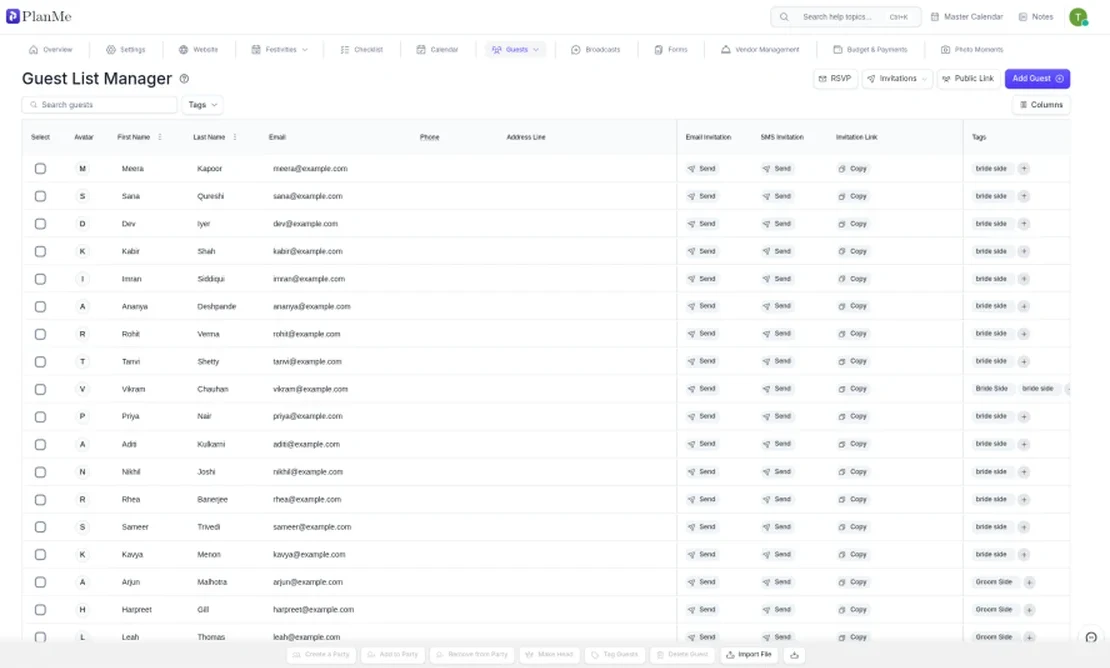
In PlanMe the wedding is one event made of festivities, and there is one guest list for all of them. The template was built to drop straight in:
- Add your festivities first, named exactly like the columns in your sheet (Mehndi, Haldi, Sangeet, Wedding, Reception, or your own names).
- Go to Guests and click Import File. It takes a CSV or Excel file. From Google Sheets, use File, Download, then .xlsx or .csv of the Guest list sheet.
- Match the columns. PlanMe reads First Name, Last Name, Email, Phone Number, Address and one column per festivity. In the festivity columns, Yes means invited and No or blank means not invited. Leave the RSVP, diet and travel columns unmatched.
- Review duplicates. PlanMe flags rows that share a phone number, an email or a full name with a guest already on the list or earlier in the file, and lets you skip them.
- Group households and add tags. Each row comes in as its own guest. Select the people in one household and use Create a Party, so one invitation covers them. Select guests and use Tag Guests for side or tier, such as “bride side” or “tier B.”
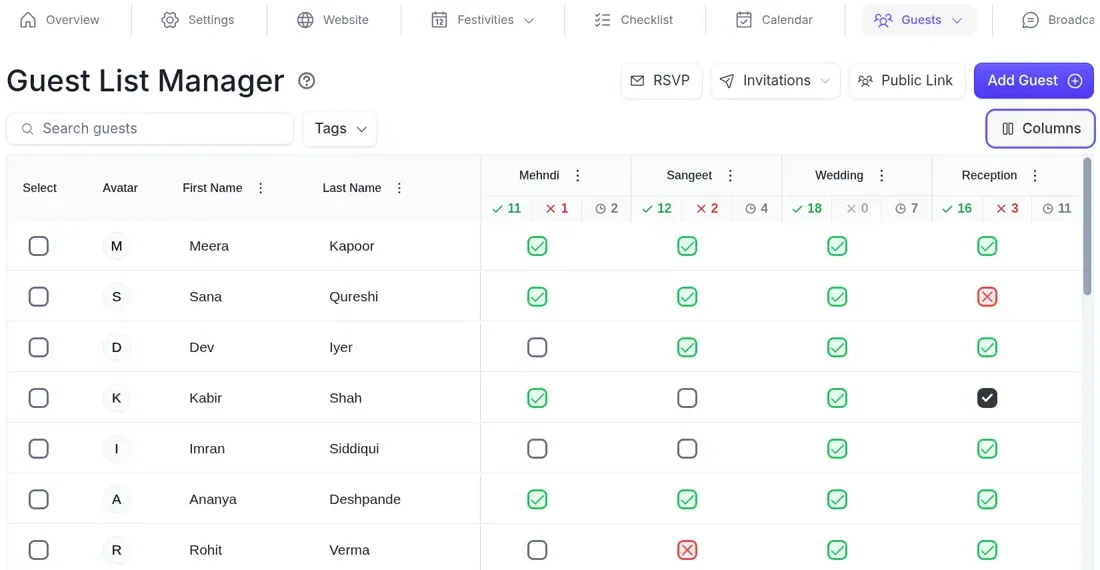
From there, replies stop being your job. Each guest gets a private RSVP link by email or text that shows only the festivities they are invited to, with no login and no app, or they can look themselves up on your wedding website. Their answers land in the RSVP column for each festivity, with accepted, declined and pending counts on top, and you can still mark a phone-call answer yourself. Ask for meals and dietary needs as RSVP questions, send email or SMS reminders to guests picked by tag or RSVP status, and export the list as a CSV whenever a caterer wants numbers.
What PlanMe does not do, so you can plan around it: it does not import households, tags or RSVP answers from a sheet (you group and tag after the import), it sends by email and SMS rather than WhatsApp, and seating charts aren’t live yet. The checklist, calendar, budget and vendor quotes sit in the same event as the guest list, and both families and your planner can work in it together. See RSVP for multiple events for the short version, or pricing.
Other places your sheet can go
Most wedding websites import a spreadsheet too, and some do parts of it better. Joy’s guest list imports a CSV and maps names, addresses, tags and party groupings, so households and tags come across in one step, and it uses tags to decide which guests see which events. Zola’s guest list manager takes an uploaded spreadsheet and adds address collection and envelope addressing if you buy its stationery. The Knot has its own downloadable spreadsheet that you paste into its Guest List Manager, with events such as a rehearsal dinner. For how they compare on a weekend with four or more festivities, see best South Asian wedding planning tools (2026), and if your list is already in Zola, Zola alternatives for South Asian weddings walks through exporting it.
Sources
Checked October 19, 2026. PlanMe import and guest list behaviour checked against the product.
- r/DesiWeddings: Spreadsheet catered to desi weddings?
- r/DesiWeddings: Spreadsheet RSVP Tracker
- r/DesiWeddings: Parents and bf cannot agree on guest list
- r/weddingplanning: Anyone else end up with 4 separate guest lists (and RSVP lists) for one wedding?
- r/weddingplanning: Guest list help
- Shaadify: Wedding guest list template for Indian weddings
- Mandap Chat: Wedding Guest List Template for Indian Weddings, the 12-Column System
- Wedd.ai: Free Wedding Guest List Template and RSVP Tracker
- Joy: Wedding Guest List Manager
- Zola: Free Wedding Guest List and RSVP Tracker
- The Knot: Guest List Manager, How to Use and FAQ
Common questions
What should an Indian wedding guest list template include?
Names, a household so families stay together, whose list each guest came from, bride's or groom's side, a tier, adult or child, contact details with country codes, where they are travelling from and whether they need a hotel, diet (vegetarian, Jain, halal and so on), and then two columns per festivity: invited (yes or no) and RSVP (yes, no, or blank until they answer). Headcounts per festivity come from those last columns.
Should a wedding guest list have one row per person or one row per family?
One row per person, with a Household column that groups everyone on the same invitation. Families reply together, but caterers, chairs and shuttles count people, and on a multi-day weekend the people in one family are often invited to different festivities. A child may come to the sangeet and skip the late reception. One row per person handles that; one row per family hides it.
How do I make a wedding guest list for multiple events in Google Sheets?
Keep one master sheet, not one tab per event. Add a pair of columns for each festivity, invited and RSVP, and count each festivity with COUNTIFS, for example =COUNTIFS(S:S,"Yes",X:X,"Yes") for people invited to the sangeet who said yes. Our free template has the columns, dropdowns and a Headcounts sheet built in; upload the .xlsx to Google Drive and save it as a Google Sheet.
How do we combine the bride's family list and the groom's family list?
Agree on the columns first, then paste both lists into one sheet with an Added by column so you always know whose list a name came from. Sort by last name and phone number to find people both families added, keep one row for each, and mark them Both. Set a date after which new names need both families to agree.
What percentage of invited guests actually come?
There is no fixed rate. Joy's guest list page gives a rule of thumb of about 85% of local guests and 55% of out-of-town guests. For a South Asian weekend, treat that as a starting estimate, then plan per festivity from real RSVPs, because close family usually comes to everything and colleagues usually come only to the reception.
Can I import this guest list template into PlanMe.Club?
Yes. In PlanMe.Club, Guests has an Import File button that takes a CSV or Excel file and reads first name, last name, email, phone number, address and one column per festivity, where Yes means invited. Each row comes in as its own guest, so you group households afterwards with Create a Party and add side or tier with Tag Guests. RSVP, diet and travel columns are not imported.
Is the guest list template free?
Yes. The Excel file and both CSV files are free to download and use, with no sign-up. The example sheet is fictional data for our showcase couple, Anaya and Rohan.