On this page
- The short answer
- How one wedding ends up with four guest lists
- Write a rule for each event before you write names
- Worked example: four events, one list
- Tricky guests: who goes where
- Plus-ones and kids, event by event
- Two families, one list: who owns which event
- Telling guests which events they’re invited to
- Keeping events off the wrong guests’ screens
- What a guest list app needs for multiple events
- Running separate event lists in PlanMe
- Sources
- Common questions
Most advice on multi-event guest lists jumps straight to the RSVP form. We’ve covered that in our guide to RSVPs for a multi-event wedding. This guide is about the step before it: deciding who belongs on each event’s list, handling the guests who don’t fit neatly, agreeing who owns which list between two families, and telling people what they’re invited to without hurting anyone.
The examples use mehndi, sangeet, wedding and reception, because that’s the most common shape we see. The same method works for a haldi, a pithi, a garba, a nikah and walima, or a Sikh Anand Karaj with a jaggo the night before. Swap in your own events.
The short answer
Keep one master guest list, one row per guest, grouped by household. Before adding names to any event, write a one-line rule for who each event is for, with a cap, a plus-one policy and a kids policy. Then mark which events each household is invited to, let the host of each event sign off on its list, and send each household only its own events. Each event’s “separate list” is just a filter of the master list, so nothing drifts.
That’s also how Joy’s editors put it in their guide to Indian weddings with different guest lists: build one master list, then label every guest by event. The rest of this guide is the part that takes real work: the rules, the edge cases and the conversations.
How one wedding ends up with four guest lists
Nobody plans to have four lists. It happens one reasonable step at a time:
- The mehndi is at the bride’s family home or a small hall, so her mom starts a short list for it.
- The sangeet needs a dance roster, so a cousin makes a sheet of performers and their families.
- The groom’s family sends their reception names as a forwarded message or a photo of a notebook.
- The wedding website collects RSVPs, but only some guests use it, and the rest reply to whoever invited them.
By the time the caterer asks for a final count, nobody trusts any of the numbers. That’s almost exactly the post that started a thread on r/weddingplanning:
“I’m manually updating multiple spreadsheets and chasing RSVPs from guests for each event. Is there a better way?”
One reply puts the whole fix in two sentences:
“I would avoid having four (or more) separate lists. Just keep one master list and give each person the access to see/RSVP to events as needed.”
On r/DesiWeddings, someone using a 36-tab Western wedding spreadsheet asked for one built for 3 to 4 events with different guest lists. A commenter who had kept a whole folder of sheets still landed in the same place:
“I would suggest you keep the guest list on one sheet with different columns for the events and a simple Y / N for inviting them.”
If you already have the columns sorted, our Indian wedding guest list template covers the layout and the headcount formulas. Here we’ll focus on filling those columns in.
Write a rule for each event before you write names
Most guest list fights aren’t about a person. They’re about a rule nobody wrote down. If the sangeet is “family and anyone who’s dancing,” the question “why is Rohan’s colleague at the sangeet?” answers itself. So before anyone adds a name, agree on five things for every event:
- Who it’s for, in one line. “Women from both families and the bride’s friends.” “Everyone who’s performing, plus family.” “Everyone we’re inviting to anything.”
- The cap. The venue’s comfortable capacity or the number the budget can feed, whichever is lower. A home mehndi has a cap even if nobody says it out loud.
- The host and list owner. The family paying for or hosting the event signs off on its list, even when both families contribute names.
- The plus-one policy. Named partners only, partners of a certain length, or nobody extra.
- The kids policy. All children, family children only, or adults only.
The usual shape, which Desi wedding guides from Anvaya to ShubhLink describe in much the same way, is a funnel: the smallest, most private events are for immediate family and the closest friends; the mehndi and sangeet add extended family and the couple’s friends; and the ceremony and reception are for everyone, including parents’ friends, colleagues and the community. Your families may draw the lines elsewhere, and that’s fine, as long as you draw them before the names go in. If you need a refresher on what each event involves, see Indian wedding events in order and the per-event guides to the mehndi, haldi and reception.
Worked example: four events, one list
Here’s how the rules looked for Anaya and Rohan, the fictional couple in our showcase plan, hosting a mehndi, a sangeet, the wedding ceremony and a reception over one long weekend. All of it is example data, not a benchmark.
| Event | Who it’s for | Cap | List owner | Plus-ones | Kids |
|---|---|---|---|---|---|
| Mehndi | Women from both families, close family, the bride’s friends | 120 | Bride’s family | No | Yes |
| Sangeet | Family from both sides, everyone performing, the couple’s friends | 220 | Both families | Named partners only | Yes |
| Wedding ceremony | Family, friends and family friends who’d come to the religious ceremony | 300 | Both families | Named partners only | Yes |
| Reception | Everyone invited to anything, plus colleagues, neighbors and parents’ wider circle | 350 | Both families | Named partners; colleagues come solo | Family children only |
With the rules agreed, filling in the list is mostly mechanical. Each household gets a row (or a group of rows, one per person), a side (bride’s, groom’s or both) and a tick for each event. In practice, the ticks fall into a few patterns:
- All four events: both sets of grandparents, aunts and uncles, first cousins and their families, the couple’s closest friends.
- Sangeet, wedding and reception: second cousins, family friends who are practically family, the couple’s wider friend group, and the men of families where the mehndi is mostly women.
- Wedding and reception: parents’ friends, older community members who’d want to see the ceremony.
- Reception only: colleagues, neighbors, business contacts, the people the parents “have to” invite.
Then check each column against its cap. If the sangeet comes out at 260 against a cap of 220, the rule is too loose or the venue is too small, and you’d rather find that out now than in RSVP week. Remember that invited isn’t the same as coming: run each event’s invited count through the guest attendance calculator before you decide anything is over the cap.
Over the cap for one event?
Enter the venue cap for the sangeet or the reception, your current guest count and your tiers, and the guest list cut calculator shows how many guests to cut and which tiers still fit, right on the page. No sign-up.
Open the guest list cut calculatorTricky guests: who goes where
Rules handle most of the list. These are the guests that send people back to the family group chat. Our suggestions follow the example rules above; yours may differ.
| Guest | Invite to | Why |
|---|---|---|
| A friend flying in from London | Every event you can | Someone crossing an ocean for one evening will feel it. Travel usually earns a guest more events, not fewer. |
| Rohan’s manager | Reception | Colleagues belong at the reception under the rules. Be consistent: if one manager is invited, check whether the others expect it. |
| A family friend both families know | Whatever the closer family decides | One row, side marked “both”. Don’t let it become two invitations from two families. |
| A cousin’s partner of three months | Events where the plus-one rule allows partners | Apply the written rule. It’s far easier to say “we’re doing named partners only at the sangeet” than to judge the relationship. |
| An aunty who’ll be hurt not to be at the mehndi | The mehndi, if the cap allows | The small events are where feelings run highest. If she’d be hurt and there’s space, it’s often cheaper to add one chair than to manage the fallout. |
| Newer friends added after the first wave of declines | Sangeet, or wedding and reception | Opinions split on sangeet-only invitations (see below). Wedding and reception is the safer default. |
| Your parents’ friends who you’ve never met | Wedding and reception | This is what the reception is for. Keep the smaller events for people you know. |
Is a sangeet-only invitation rude?
Desi wedding writers disagree, so here are both sides. The ShaadiShop blog’s advice on inviting everyone to everything is blunt: “DON’T invite guests to the sangeet-only. It’s tacky on your part and insulting to the guest.” Reception-only, on the other hand, is standard almost everywhere.
On r/DesiWeddings, a poster planning a US wedding asked whether they could invite newer local friends to the sangeet only, after more late declines than expected for the wedding itself. They described the sangeet as just as grand as the reception. Their update:
“The friends have taken it really well so far and seem super excited”
It comes down to expectations. A guest who wasn’t expecting a wedding invitation will read a sangeet invitation as a bonus. A relative who expected the wedding will read it as a snub.
Plus-ones and kids, event by event
With multiple events, the list has to answer “with whom” as well as “who”. Joy’s Indian wedding guide calls out the same trap: “A guest might bring a plus-one to the reception but not to the intimate haldi.” A few rules of thumb:
- Name the partner, per event. “Kabir Shah and guest” invites argument. “Kabir Shah and Meera Kapoor” for the sangeet, wedding and reception doesn’t.
- Decide kids per event, not per wedding. Kids at a daytime mehndi are part of the fun. A late reception with a bar is another matter. Whatever you choose, say it on that event’s invitation, not in a message afterward.
- Count people, invite households. Desi families usually reply as one household, but caterers and chairs count people. Every event needs a per-person count even if one person answers for the family.
- Ask the dietary question once. Vegetarian, Jain, halal, allergies: collect them once with the RSVP and reuse them for every event’s caterer.
Two families, one list: who owns which event
Merging the bride’s and groom’s lists is where most duplicate rows and most hurt feelings come from. What works:
- Same columns for everyone. Send both families the empty list first: name, household, phone with country code, side, and a column per event.
- One list, not a bride tab and a groom tab. Mark each household bride’s side, groom’s side or both. Sort by last name and phone number to catch people both families added.
- Each event has an owner. Both families can suggest names for any event; the host signs off on its final list. When the groom’s family hosts the reception, their call on its list is final.
- Agree on a cut-off date. After it, a new name for any event needs both families to agree. Lists grow quietly otherwise, and late additions make earlier “no”s look personal.
- Share costs by event, not by headcount guesses. If the families split costs, each event’s final yes count is what the split should use. Our guide on who pays for an Indian wedding covers the common splits.
Telling guests which events they’re invited to
ShubhLink’s guide to inviting guests to only some functions makes the most useful point we’ve read on this: “Hurt comes from how they find out, not from the fact itself.” Some options, all of which work if you’re consistent:
- One main card plus an insert per event. Each household gets the inserts for its events only. On a Knot community thread about Mehndi, Sangeet and Reception invitations, couples describe exactly this: inserts per event, with replies tracked per event.
- Separate invitations from each host. The same thread suggests the family hosting each event sends its own invitation. It fits the list-owner rule above.
- A digital invitation per tier, or a personal RSVP link. Make one version per group (“Full weekend”, “Sangeet onwards”, “Reception only”) and check which version you paste every time. Better still, give each household a link that only shows its own events.
What to say when someone asks
Someone will ask. Keep the answer about the event, not the person, and say it the same way to everyone in the same group. Lines that work:
- “The mehndi is at home, and it’s just immediate family. We’d love to see you at the reception.”
- “The hall only holds 220, so we kept the sangeet to family and the people performing.”
- “The couple wanted the smaller events to stay small, and we’re respecting that.”
And two habits that prevent most of the questions: don’t post the full schedule in a group where not everyone is invited to everything, and ask close family to hold off on posting photos of the smaller events in big groups until after the reception. If it was an honest oversight, fix it fast with a call.
For the reminder messages that follow, our RSVP reminder wording guide has ready-to-send texts and emails, and the RSVP deadline calculator works back from each caterer’s final-count date.
Keeping events off the wrong guests’ screens
A shared wedding website is the easiest place to leak the schedule. One poster on r/weddingplanning described exactly what they wanted before choosing a site:
“Ideally, i would want a flow where the guests enter their names or emails and only see the events they are invited to on the schedule.”
The big wedding sites handle this differently, according to their own help pages:
- Joy: you tag guests, then set an event’s privacy to “Specific guests” and pick the tags. Guests unlock the schedule by entering their name and see only their events (Joy: private events, Joy: multiple events).
- Zola: you tick the events each guest is invited to under “Events Invited To”, guests can only RSVP to those, and you choose whether each event is public on the website (Zola: choosing who’s invited, Zola: RSVPs for multiple events).
- The Knot: you mark guests as invited to each event in the Guest List Manager, can limit RSVPs to invited guests, and must enable each new event in RSVP settings (The Knot: adding guests to an event, The Knot: collecting RSVPs).
Whichever you use, test it: add a fake “reception only” guest, look them up on your own site from a private browser window and check what they can see. For a side-by-side look at the tools, see how PlanMe compares with Zola, Joy and The Knot, or the head-to-head PlanMe vs Joy.
What a guest list app needs for multiple events
A spreadsheet is fine while you’re building the list. Our spreadsheet vs app guide covers when it stops being fine. If you’re choosing a wedding guest list app for several events, check these before you import anyone:
- Can each guest be invited to some events and not others?
- Does each household get one reply that covers only its own events, with a yes or no per event?
- Can an uninvited guest see the private events anywhere: the schedule, the RSVP form or a reminder?
- Does every event show its own invited, yes, no and pending count?
- Can you set plus-ones and see dietary needs per guest, not just per household?
- Can you tag guests by side and message a group, such as everyone who hasn’t replied?
- Can both families and a planner edit the same list, without sharing one login?
Our roundup of the best wedding websites for multiple events runs six tools through tests like these, including where others do better than PlanMe.
Running separate event lists in PlanMe
PlanMe.Club is our product, built for weddings with several events and two families. In PlanMe, each event (mehndi, sangeet, wedding, reception and so on) is called a festivity. Here’s how the method above maps onto it:
- Each event added once. Add every event with its own date, venue and schedule. See festivities.
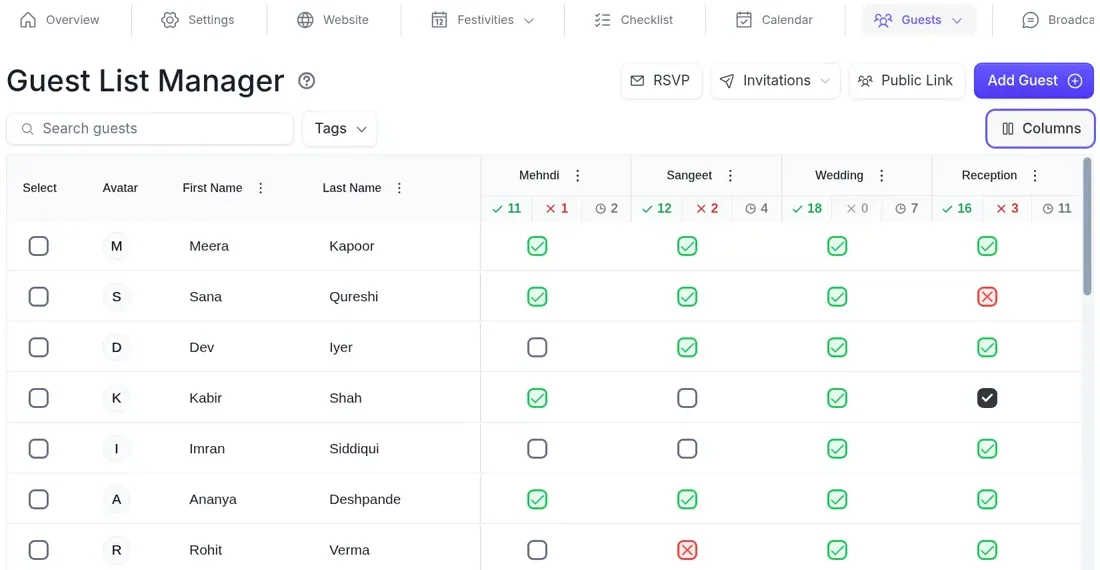
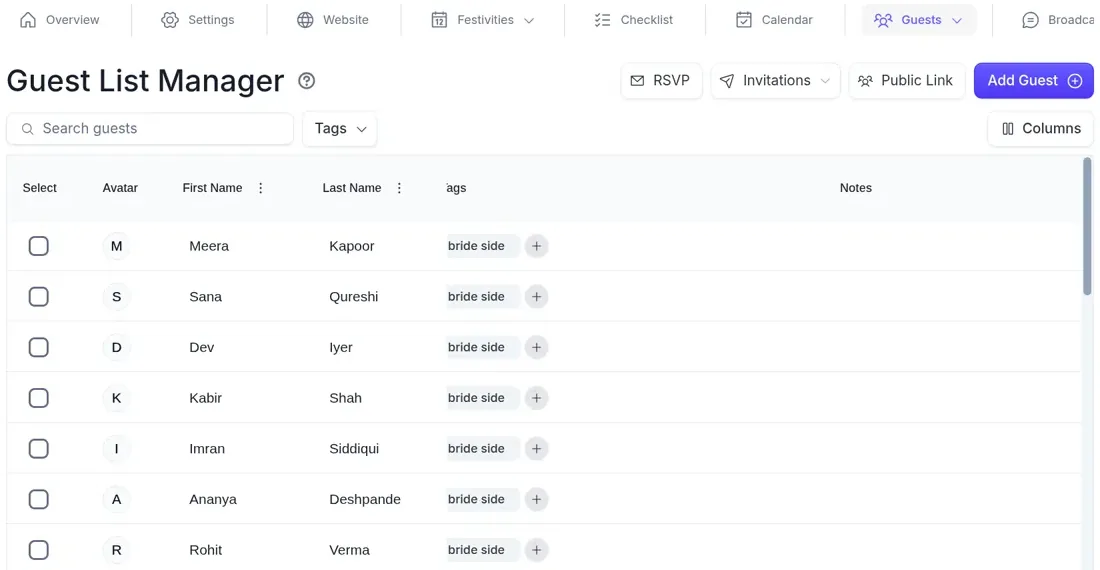
- One list, tagged by side. Import your sheet from CSV or Excel, group guests into households, tag them bride’s side, groom’s side or anything else, and choose exactly which events each guest is invited to. See guest management.
- A private RSVP link per household. Each household gets a link by email or text that shows only the events its guests are invited to, with no login, and everyone answers for each event. Guests can also look themselves up on your wedding website. See RSVP for multiple events.
- Counts per event. Every event keeps its own accepted, declined and pending count on the guest list.
- Plus-ones with approval. Add plus-ones and companions, with an approval step.
- Messages by tag or RSVP status. Send email or SMS broadcasts to a tag such as “groom’s side” or to everyone who hasn’t replied. If you want to message just one event’s guests, tag them for it. See guest email and SMS.
- Both families in one plan. Invite parents, siblings or a planner as collaborators and choose which parts of the plan each can use. See team and collaboration.
What PlanMe doesn’t do, so you can plan around it: it sends by email and SMS, not WhatsApp, and it doesn’t print invitations. Seating is manual, per event, from the guests who accepted, using the seating chart.
One guest list, a separate invite list for every event
Add each event once, tag every household by side, invite each guest to just their events and give every household a private RSVP link that shows only those events. Both families can work in the same plan. Free during beta.
Start your guest list in PlanMeSources
Checked October 31, 2026. Reddit quotes are as posted by the commenters and are not verified. The event rules, edge cases and the Anaya & Rohan showcase are our own examples and use fictional data.
- Joy: How to Manage Multiple Wedding Events with Different Guest Lists for Indian Weddings
- Joy Help Center: Using the Private Events Feature
- Joy Help Center: Managing RSVPs and schedules when not everyone is invited to every event
- Zola Help Center: How do I choose who’s invited to my events?
- Zola Help Center: Can I collect RSVPs for multiple events?
- The Knot Help Center: How do I add guests to an event?
- The Knot Help Center: How do I collect RSVPs through my Guest List?
- The Knot Community: Multiple Event Invitations - Mehandi/Sangeet, Rehearsal Dinner & Wedding/Reception
- ShubhLink: Inviting guests to only some wedding functions, kindly
- ShaadiShop: Indian Weddings and Inviting Everyone to Everything
- Anvaya: How to Build Your South Asian Wedding Guest List
- r/weddingplanning: Anyone else end up with 4 separate guest lists (and RSVP lists) for one wedding?
- r/DesiWeddings: Spreadsheet catered to desi weddings?
- r/DesiWeddings: Is it okay to invite someone to the Sangeet only?
- r/weddingplanning: Indian wedding with multiple events with selective guest list
Common questions
Should every wedding event have its own guest list?
Every event should have its own invited list and its own RSVP count, but not its own spreadsheet. Keep one master list with one row per guest, grouped by household, and mark which events each guest is invited to. The mehndi list, the sangeet list and the reception list are then just filters of the same list, so a phone number or spelling fixed once is fixed everywhere.
Is it rude to invite some guests to only the reception?
No. At South Asian weddings with several events, reception-only invitations for colleagues, neighbors and parents’ wider circle are common and expected. What causes hurt is how people find out, for example seeing the full schedule in a family group chat. Send each guest only the events they’re invited to, and have a short, kind answer ready if someone asks.
Can I invite someone to the sangeet only?
Opinions differ. Some Desi wedding blogs say a sangeet-only invitation is insulting and you should invite the guest to the wedding or reception instead, or not at all. Others have done it happily: one poster on r/DesiWeddings invited newer local friends to the sangeet only after more late declines than expected, and reported the friends took it well. It works best when the sangeet is a full party and the guest wasn’t already expecting a wedding invitation.
How do I stop guests seeing events they’re not invited to?
Don’t post the full schedule anywhere every guest can see it, including the family group chat. Use invitation inserts or separate invitations per event, and a wedding website or RSVP tool that shows each guest only their own events. Joy, Zola, The Knot and PlanMe all let you invite guests to specific events; check each tool’s help pages for exactly what an uninvited guest can see on the website schedule.
How do I merge both families’ guest lists without duplicates?
Give both families the same columns, paste everything into one master list, then sort by last name and scan phone numbers to find people both sides added. Keep one row for each and mark them as both sides. Then agree on who owns each event’s list, usually the family hosting it, and a cut-off date after which a new name needs both families to agree.
Can I manage separate event guest lists in Google Sheets?
Yes, for building the list. Use one sheet with a row per guest, an invited column and an RSVP column for each event, and filters or COUNTIFS formulas for each event’s numbers. It gets harder once replies arrive by text and phone, several people edit the sheet, and guests need to RSVP to only their own events. That’s usually the point couples move the list into a tool built for multi-event RSVPs.