On this page
- The short answer
- Why couples look for a The Knot alternative
- What The Knot does well for a multi-event wedding
- The 15-minute test: three fake households
- The Knot alternatives compared
- 1. PlanMe.Club
- 2. Joy
- 3. Cordially Wed
- 4. Zola (and the acquisition)
- 5. Minted
- Keep The Knot for vendors
- When to stay on The Knot
- Moving off The Knot in 7 steps
- Sources
- Common questions
PlanMe.Club is our product, and it’s ranked first below because it’s built for exactly this kind of weekend. So every claim about another tool links to that company’s own help center or product page, every tool gets a “best for” line and at least one thing it does better than PlanMe, and anything a company doesn’t document is marked as not documented rather than guessed. Features checked November 1, 2026.
The examples use a mehndi, sangeet, wedding and reception, the most common shape we see. The same checks work for a haldi, a garba, a nikah and walima, or a jaggo before an Anand Karaj. Swap in your own events.
The short answer
The Knot handles several events better than its reputation suggests: you can add as many events as you like, tick which guests are invited to each, and collect an RSVP per event. Where it gets awkward for a Desi weekend is what guests see. An event open to select guests is hidden from the website and only shows up inside the RSVP pop-up, with a short list of details. Couples share one login, so parents can’t have their own.
- Guests should see only their own events: Joy (personalized schedule) or PlanMe and Cordially Wed (a private link per household).
- Texting relatives is the big job, including WhatsApp abroad: Cordially Wed, or Joy with its paid Messaging Plus.
- You want guests, seating per event, budget, vendor quotes and family logins in one plan: PlanMe.
- You care most about the registry or matching paper: Zola or Minted. Note that Zola is in the process of joining The Knot’s parent company.
- You’re still hiring vendors: keep The Knot open for that, whatever you choose for guests.
Why couples look for a The Knot alternative
Search “the knot alternatives” and most of what comes back is Reddit. The reasons people give fall into three groups, and only one of them is specific to South Asian weddings.
1. The website felt glitchy or dated
This is the most common complaint, and it’s worth knowing that it isn’t universal. In a “Zola v The Knot v others?” thread on r/weddingplanning, one commenter wrote:
“I started off with the Knot and moved to Zola after reading too many horror stories about the Knot crashing and RSVP issues. The Knot is popular for good reason and their budget tool is awesome.”
In another The Knot vs Zola thread, a commenter who tested Joy, Zola and The Knot went with The Knot, finding its templates better and its linked-registry syncing easier to control. Others in the same Zola-or-Joy thread stuck with The Knot because it let them add pages freely. Treat the horror stories as a reason to test, not a verdict.
2. Privacy and ads
In a July 2026 thread asking for favorite wedding websites, one couple who tried Zola, The Knot, Joy and Minted wrote that “The Knot didn’t have any templates we liked and I wasn’t sure about all the data privacy,” and chose Minted partly because “there weren’t a ton of ads.” If that’s your reason, any of the tools below will do; pick on the guest side.
3. Different guests at different events
This is the one that matters for a Desi wedding. A 500-guest family asked r/DesiWeddings whether to use The Knot or Joy because “not everyone will be invited to the smaller events,” and the replies split. One person said The Knot let them choose who is invited to what and make events private. Others said Joy “works really well for hiding events” and weren’t sure what The Knot could do. Both answers are partly right, so the next section spells out what The Knot does.
What The Knot does well for a multi-event wedding (and where it stops)
Checked in The Knot’s own help center on November 1, 2026:
- Several events, each with its own RSVP. You can add events with a date, time, location and RSVP options, and manage response collection for each event (add or edit events, collect RSVPs).
- Invite guests to some events only. In the Guest List Manager you tick the guests invited to each event (add guests to an event).
- Private events stay off the website. An event set to “Open to select guests” never shows on the site and appears only in the RSVP pop-up for invited guests. The Knot says that pop-up can show only the event name, date and time, location, description and attire, and that a schedule added to a private event won’t display (how private events work).
- Messages from templates, by email or text. The Messaging Hub has pre-designed templates you can customize, such as RSVP reminders and day-of details, and you choose which guests receive each one (message guests).
- One shared login. You and your partner sign in with the same email and password (share an account).
- A free website. The core website is free, with a custom domain as an optional paid add-on (are websites free?).
For a Western wedding with a rehearsal dinner, that’s plenty. For a Desi weekend, the gaps show up in three places. The mehndi and haldi are often private, so their dress code, parking note and timing squeeze into a pop-up instead of a proper page. Both mothers usually want to edit the list, and with one shared login they’d be using yours. And the budget side is Budget Advisor, which The Knot describes as estimating costs rather than tracking every payment.
The 15-minute test: three fake households
Feature lists all say “multiple events.” You only find out how a tool behaves by trying it with the guests who cause trouble. Every tool below has a free way in, so before you move 400 names, create a test site and add three made-up households:
| Test household | Invited to | What it tests |
|---|---|---|
| The Mehtas: 4 people | Mehndi, sangeet, wedding, reception | One parent replies for everyone, and the college-age son is a no for the mehndi because his flight lands that night. Does the tool keep a separate answer per person, per event? |
| Dad’s colleague and spouse | Reception only | When they open the site or their RSVP, can they see that a mehndi or sangeet exists? |
| Nani’s neighbor | Mehndi only (private) | Can the mehndi have its own timing, dress code and directions that only invited guests see? |
Then check six things and write down the answers:
- Open the site as the colleague in a private browser window. What events can you see?
- RSVP as the Mehtas with different answers per person. Does each event’s count come out right?
- Look for a per-event count of accepted, declined and no reply, rather than one weekend total.
- Send a test reminder only to people who haven’t replied. Is texting extra, and to which countries?
- Invite a parent as a second user. Do they get their own login, and can you limit what they edit?
- Download the list. Do you get every event’s answer in the export?
This is the same test Cordially Wed suggests in its own per-event RSVP guide: a household with mixed answers, a reception-only guest and an invitation-only dinner. It’s a fair test for every tool, ours included.
The Knot alternatives compared
Ranked for a South Asian weekend where different guests go to different events. PlanMe.Club is our product. Each row links to the full section below and its sources.
| Feature | 1. PlanMe.Club (ours) | The Knot (baseline) | 2. Joy | 3. Cordially Wed | 4. Zola | 5. Minted |
|---|---|---|---|---|---|---|
| Best for | Several events with overlapping lists, both families and a planner in one plan | Finding and booking vendors, with a free website in the same account | A polished free site where each guest unlocks a personalized schedule | Texting relatives by SMS and WhatsApp, with replies in one inbox | Registry and vendor marketplace for a wedding with one or two side events | A free site that matches printed stationery |
| What guests see | A private RSVP link per household that shows only their events; no login | Private events hidden from the site; shown only in the RSVP pop-up with limited details | Private events shown only to tagged or chosen guests after they enter their name | Event audiences by guest, list or tag | Private events hidden from the schedule for everyone; invited guests see them on the RSVP page | With Private RSVP on, events show only to invited guests on the Guests page |
| Texting | Email and SMS by guest tag or RSVP status; no WhatsApp | Email or text from customizable templates | Paid Messaging Plus: SMS to US and Canada, WhatsApp elsewhere | SMS and WhatsApp, paid | US numbers only; a paid plan to text the whole list | Not documented on the pages we checked |
| Beats PlanMe on | - | Vendor marketplace and reviews, room-block booking, custom domain | WhatsApp delivery abroad, cash funds | Two-way texting and WhatsApp | Registry, vendor marketplace, template range | Artist-designed templates matched to paper, custom URL |
1. PlanMe.Club: best when the whole weekend needs one plan
- Best for
- South Asian weddings with three or more events, guest lists that overlap, and both families or a planner working on the same plan.
- Cost
- Free during beta. Paid plans are planned; pricing isn’t final (pricing).
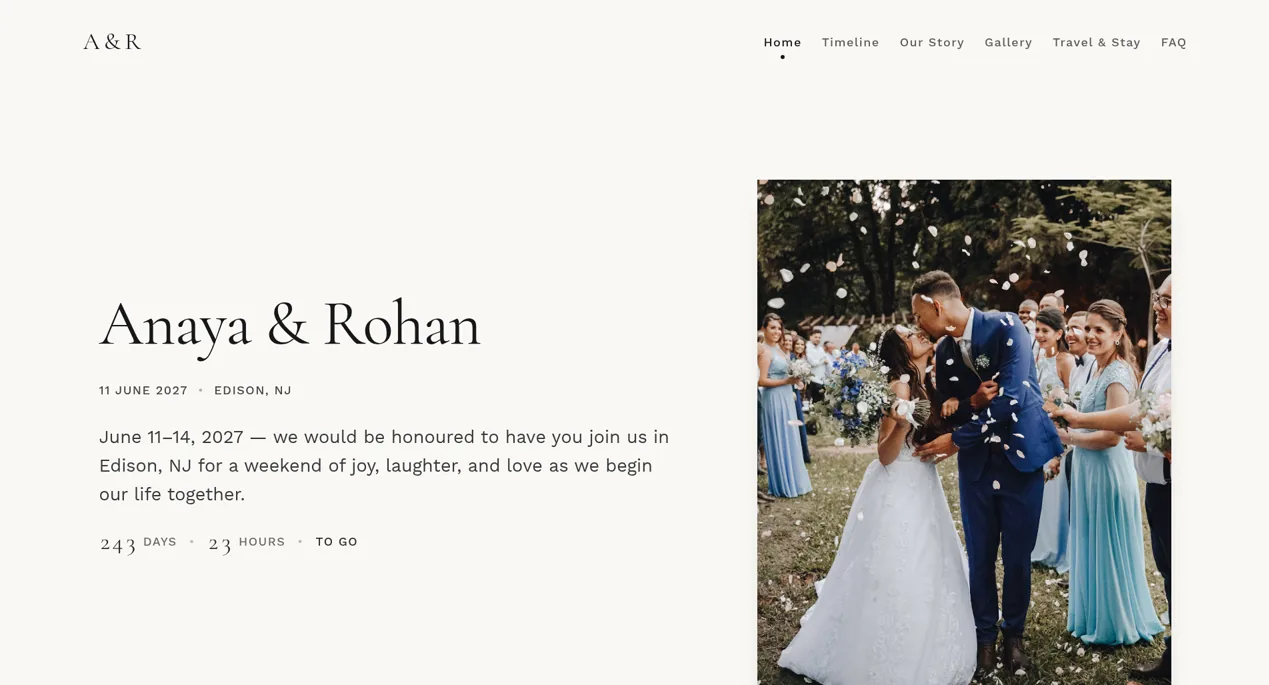
PlanMe is a planning workspace, and the wedding website is one part of it. In PlanMe each event of your wedding (mehndi, sangeet, wedding, reception) is called a festivity, with its own date, venue, itinerary, dress code and menu. What that means against The Knot:
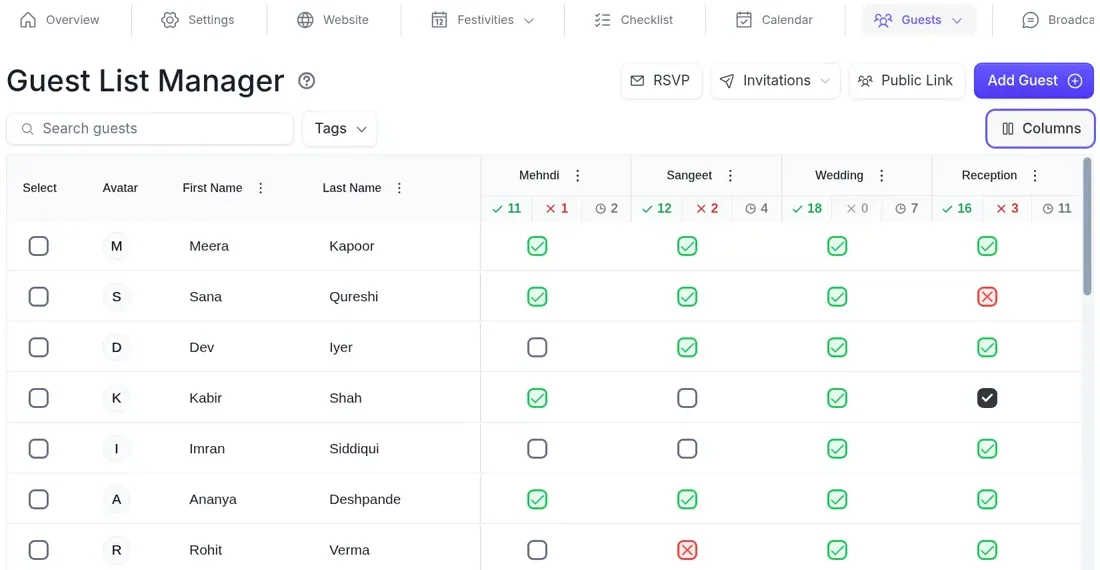
- Guests see only their events. Each household gets a private RSVP link by email or text that shows only the events they’re invited to, with no login and no app (RSVP for multiple events). The private mehndi gets the same full details as the reception, not a pop-up.
- One guest list, invited by event. Households, tags by family side, and an accepted, declined or pending answer per person per event (guest management). Import from CSV or Excel, with duplicates flagged as you import.
- Separate logins with roles. Invite parents, siblings or a planner by email and choose which parts of the plan each can use (team and collaboration).
- Seating for each event. A floor plan per event, built from the guests who accepted, with PDF and CSV exports (seating chart). You seat people yourself; it doesn’t auto-seat.
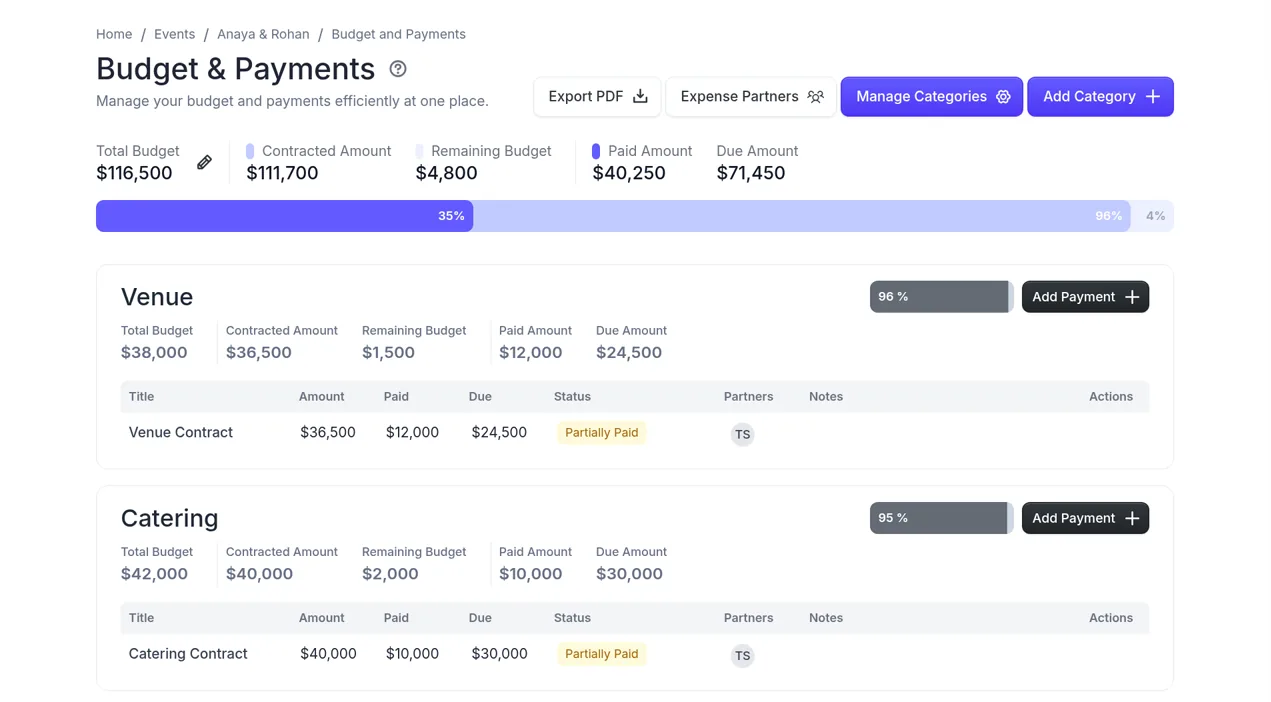
- Budget and vendor quotes. One budget for the wedding by category, with contracted, paid and due amounts and who paid each payment, plus vendor quotes with a status from pending to approved (budget, vendor management).
- Messages by tag or RSVP status. Email or SMS broadcasts to a tag such as “groom’s side” or to everyone who hasn’t replied (guest email and SMS).
- A website and a registry. A wedding website with a travel page, and a gift registry where guests reserve a gift or mark it bought. Save the whole setup as a template if you plan events for others.
Where PlanMe is weaker, so you can plan around it: it’s new and still in beta. It sends email and SMS, not WhatsApp. There’s no vendor marketplace, no custom domain (sites live at a planme.club address), no cash funds in the registry and no printed invitations. If any of those is a must, the tools below do them better.
2. Joy: best free site for a personalized schedule
- Best for
- Couples who want a polished free website where every guest sees their own schedule, and who may need to text relatives abroad.
- Cost
- Free website. Texting needs Messaging Plus, a one-time purchase (Joy help).
- Beats PlanMe on
- WhatsApp delivery to non-US and non-Canadian numbers, and cash funds.
Joy is the strongest direct answer to The Knot’s private-event pop-up. You make a schedule item private and show it to guests with a tag, plus any individuals you add. On the schedule page guests click “Unlock Your Schedule,” enter their name, and see only the events they’re invited to (Joy: private events, multiple events). Joy notes that name matching can trip on nicknames, so “Mike” may not find “Michael,” and suggests sending invitations through Joy so each guest gets a personalized link instead.
For families with relatives in India, Pakistan or the UK, Joy’s texting detail matters: Messaging Plus sends SMS to US and Canadian numbers and WhatsApp to every other number, and won’t retry by SMS if a number isn’t on WhatsApp (Joy: Messaging Plus). Its registry supports cash funds (Joy: cash funds). What Joy doesn’t document is a budget tracker or vendor quotes, so you’d run those somewhere else.
3. Cordially Wed: best when texting is the main job
- Best for
- Families whose guests answer texts, not emails, including relatives on WhatsApp.
- Cost
- Guest management and RSVPs free; texting paid (Cordially Wed).
- Beats PlanMe on
- SMS and WhatsApp in one two-way inbox, so replies come back to the couple.
Cordially Wed offers per-person, per-event RSVPs with households, event audiences set by guest record, list or tag, and SMS plus WhatsApp conversations in one inbox (Cordially Wed: per-event RSVP). If your aunties will answer a WhatsApp message in five minutes and ignore an email for five weeks, start here, and test it with the three households above before you commit.
4. Zola: best registry, with an asterisk
- Best for
- Couples who care most about the registry and a vendor marketplace, with one or two side events.
- Cost
- Free website. Texting the whole guest list needs a paid plan (Zola help).
- Beats PlanMe on
- Registry, vendor marketplace and the range of website and invitation templates.
Zola collects RSVPs for every event on one site (Zola: multiple events), and its guest messaging lets you group guests by relationship or event attendance (Zola: guest messaging). Texting only works with US phone numbers for now, so relatives abroad get email instead (Zola: texting outside the US). For a Desi weekend, the private event setup works much like The Knot’s: a private event is hidden from the schedule page for everyone, and invited guests see it on the RSVP page after searching their names. Zola’s help center says it doesn’t currently have a way to show events to select guests on the schedule page (Zola: private events). So if the pop-up was your problem with The Knot, Zola is a sideways move.
The asterisk: on October 14, 2026, The Knot Worldwide announced an agreement for Zola to join its portfolio. The deal is subject to closing conditions, including regulatory clearances, and both are to continue as separate consumer brands. As of November 1, 2026, nothing has changed for couples yet. But if you’re leaving The Knot because of the company rather than the product, Zola will soon be part of the same company. Our Zola alternatives guide covers the other direction.
5. Minted: best if the website should match your paper
- Best for
- Couples ordering printed invitations from Minted who want a free website in the same design.
- Cost
- Free website; a fully custom URL is a paid upgrade (Minted).
- Beats PlanMe on
- Artist-designed templates that match its stationery, and a custom URL.
Minted lets you add as many events as you like, each with its own RSVP questions, and when Private RSVP is on, events are visible only to invited guests on your site’s Guests page (Minted: add an event). You choose which events each guest is invited to, and the guest list with RSVP statuses and meal choices can be downloaded as a spreadsheet (Minted: wedding websites). It’s a website and RSVP tool, not a planning workspace, so budget, seating and vendors live elsewhere.
Keep The Knot for vendors
You don’t have to leave The Knot to fix your guest list. Its marketplace and reviews are what it does best, and it lists the vendors you’ve booked (The Knot: manage vendors). It also offers room-block booking for guests through a partner (The Knot: room blocks). Here’s a split that works for a lot of Desi families:
- The Knot: search, read reviews, send inquiries, book.
- Your planning tool: log every quote you get, including the ones from the mehndi artist and dhol player who aren’t on The Knot, and track deposits and who paid them against one budget for the wedding.
- One guest list: in whichever tool passed the three-household test.
When to stay on The Knot
Switching costs time, and sometimes it isn’t worth it. Stay if:
- Your invitations or save-the-dates with your The Knot address are already in the mail. Keep the site and fix the guest side around it.
- Almost everyone is invited to almost everything, and the one private event is small. The pop-up is fine for a family-only haldi.
- You rely on The Knot Registry or its room-block booking and don’t want two places for guests.
- You’re inside the last six to eight weeks and RSVPs are already coming in. Moving now risks two half-lists.
Switching close to the wedding?
Enter your first event’s date, your caterer’s headcount date and your hotel block cut-off, and the RSVP deadline calculator shows the latest safe RSVP-by date and a reminder date, right on the page. Use it to check you still have time to move. No sign-up.
Open the RSVP deadline calculatorMoving off The Knot in 7 steps
If you’re switching, do it in this order so no reply is lost:
- Download everything first. On a desktop browser, click Download List at the top right of your guest list and save both the entire list and the RSVP responses (The Knot: guest list manager).
- Freeze the old RSVPs. Pick a cut-over date, tell both families, and from then on record new replies in one place only.
- Clean the file once. One row per guest, a household column, a side column (bride’s, groom’s, both), and an invited column for each event. Our guide to separate guest lists for each event covers who goes on which.
- Import and fix duplicates. Both sides usually add the same family friends. In PlanMe, duplicates are flagged as you import.
- Recreate the events, then invite by event. Copy each event’s timing, venue and dress code, then carry over the RSVPs you already have.
- Run the three-household test on the real site. Especially the reception-only guest.
- Tell guests once. One short message with the new link, saying earlier replies are saved, then a reminder only to people who haven’t replied. For wording, see our RSVP reminder wording.
To estimate how many people invited to each event will come, use the guest attendance calculator. For the RSVP setup itself, see RSVPs for a multi-event wedding; for websites only, our best wedding website for multiple events. To compare The Knot with Joy and Zola only, read Joy vs Zola vs The Knot, or go head to head in PlanMe vs The Knot. The comparison hub has every tool in one table.
Bring your The Knot guest list into one plan for every event
Import the CSV you downloaded from The Knot (duplicates are flagged as you import), add each event once, invite every household to just their events and send each one a private RSVP link that shows only those events. Free during beta.
Import your guest list into PlanMeSources
Checked November 1, 2026. Reddit quotes are as posted by the commenters and are not verified. The test households and the Anaya & Rohan showcase are our own examples and use fictional data.
- The Knot Help Center: Are wedding websites on The Knot free to use?
- The Knot Help Center: How do I add/edit events on my Wedding Website?
- The Knot Help Center: How do private events work?
- The Knot Help Center: How do I add guests to an event?
- The Knot Help Center: How do I collect RSVPs through my Guest List?
- The Knot Help Center: How do I message guests?
- The Knot Help Center: Can my fiancé and I share an account?
- The Knot Help Center: How is Budget Advisor different from the old Budgeter tool?
- The Knot Help Center: How do I manage my vendors?
- The Knot Help Center: How can I book a room block for my guests?
- The Knot: Guest List Manager, how to use and FAQ
- The Knot Worldwide: The Knot Worldwide to welcome Zola to its portfolio (October 14, 2026)
- Joy Help Center: Using the Private Events Feature
- Joy Help Center: Managing RSVPs and schedules when not everyone is invited to every event
- Joy Help Center: Send text messages with Messaging Plus
- Joy Help Center: Adding a honeymoon or cash fund
- Zola Help Center: Can I collect RSVPs for multiple events?
- Zola Help Center: What is a private event, and who can see it on my website?
- Zola: Guest messaging
- Zola Help Center: How does Premium Guest Messaging work?
- Zola Help Center: Does Premium Guest Messaging work outside of the United States?
- Minted Help: How do I add an event to my Wedding Website?
- Minted: About Minted wedding websites
- Cordially Wed: Wedding RSVPs per person, per event
- r/weddingplanning: Zola v The Knot v others?
- r/weddingplanning: The knot vs Zola?
- r/weddingplanning: Wedding Website: Zola or Joy?
- r/weddingplanning: Favorite Wedding Website and Why
- r/DesiWeddings: Which wedding/rsvp website did you use?
Common questions
What is the best alternative to The Knot for a wedding with several events?
It depends on what you need The Knot to stop doing. If different guests are invited to different events, pick a tool that shows each guest only their own events on the schedule: Joy does this with private events, and PlanMe and Cordially Wed send each household a link that shows only their events. If texting relatives is the main job, look at Cordially Wed or Joy’s paid Messaging Plus. If you want the whole plan (guests, seating per event, budget, vendor quotes and family logins) in one place, that’s PlanMe. Many couples keep The Knot for vendor search either way.
Can I export my guest list from The Knot?
Yes. The Knot’s guest list guide says to click Download List at the top right of your guest list, then choose the entire list as a table, address labels or a table of RSVP responses. Download both the full list and the RSVP responses, from a desktop browser, before you set up anything new.
Is there a free alternative to The Knot with RSVPs for each event?
Yes. Joy, Zola and Minted all have free wedding websites that collect RSVPs for several events, and Cordially Wed says its guest management and RSVPs are free, with texting paid. PlanMe is free during beta, with paid plans planned and pricing not final. Texting is the usual extra cost: Joy sells Messaging Plus as a one-time purchase, Zola needs a paid plan to text your whole guest list, and Cordially Wed charges for texting too.
Is Zola still an alternative to The Knot?
For now, yes, but it’s worth a second thought. The Knot Worldwide announced on October 14, 2026 that it has agreed for Zola to join its portfolio. As of November 1, 2026, the deal is subject to closing conditions, and both companies say Zola and The Knot will continue as separate consumer brands. If you’re leaving The Knot because of the product, Zola is still a different product. If you’re leaving because of the company, it soon won’t be a different company.
Can I keep The Knot for vendors and use another tool for guests?
Yes, and it’s a common setup. The Knot’s marketplace and reviews are useful for finding a photographer, DJ or caterer, and nothing makes you keep your guest list in the same account. Book vendors through The Knot, then track the quotes, deposits and the guest list in the tool that fits a multi-event weekend.
Which The Knot alternative can send WhatsApp messages to guests?
Joy’s paid Messaging Plus sends SMS to US and Canadian numbers and WhatsApp to other numbers, according to Joy’s help center. Cordially Wed offers SMS and WhatsApp in one inbox, also paid. PlanMe sends email and SMS, filtered by guest tag or RSVP status, but not WhatsApp.
Should I switch if my invitations already show my The Knot website address?
Usually not for the website. If cards with your The Knot address are already in the mail, keep that site live so guests can still find it, and move only the parts that hurt, such as the guest list for each event, the budget or vendor quotes, into another tool. Switching is easiest before save-the-dates or invitations go out.